Showing posts with label amazon prime. Show all posts

Sunday, August 25, 2013

Kindle Fire Sale - Discounts: Student Exclusive: Large savings on Kindle Fire, w/ Student Prime, until 11:59 pm on Sept 1

Student Kindle Fire Discounts up to $70 off with Student Prime membership

I've been mostly away for some other projects, but after returning, I saw that Amazon has a special Kindle Fire tablet discount for students only, but it requires an active student version of Prime, which is $39.

Here's Amazon's announcement.  (The text is straight from the Amazon page, to show exactly what they're offering and what's required.)


Save up to $70 on Select Kindle Fire Tablets: Exclusive Offer for Amazon Student Members

Special pricing is available on select Kindle Fire tablets to Amazon Student members with an active Prime account (six months free or $39/year plan). Join Amazon Student or start your discounted Prime membership to take advantage of this discount.  The promo codes below will become available 24 hours after activation of your account, through September 1.  New members, don't forget to check your .edu email and verify your account. 

How to Take Advantage of This Offer:
1. Place one of the tablets below in your cart.
2. At checkout, enter the appropriate promo code when prompted:
FIREHD89Kindle Fire HD 8.9" for $199
FIREHDSTKindle Fire HD for $149
FIREDEALKindle Fire for $129

If you are an Amazon Student member in a free or paid Prime plan, the discount will be applied to the corresponding item in your cart.
3. Complete your order before this promotion expires at 11:59 p.m. PST on September 1, 2013."

[End of Amazon announcement]


  These are actually very good deals.


For daily free ebooks, check the following links:
Temporarily-free books - Non-classics
USA: by:
   Publication Date  
   Bestselling   High-ratings

UK: PubDate   Popular

The Kindle Daily Deal

What is 3G? and "WiFi"?       Battery Care

Highly-rated under $1
,  Newest: $1-$2, $2-$3
Most Popular Free K-Books
U.S. & Int'l (NOT UK):
   Top 100 free
UK-Only:
   Top 100 free

Guide to finding Free Kindle books and Sources.

USEFUL for your Kindle Keyboard (U.S. only, currently):
  99c Notepad 1.1,   99c Calculator,
  99c Calendar,   99c Converter

  *Click* to Return to the HOME PAGE.  Or click on the web browser's BACK button


Below are ways to Share this post if you'd like others to see it.
-- The Send to Kindle button works well only on Firefox currently.

Send to Kindle


(Older posts have older Kindle model info. For latest models, see CURRENT KINDLES page. )
If interested, you can also follow my add'l blog-related news at Facebook and Twitter
Questions & feedback are welcome in the Comment areas (tho' spam is deleted). Thanks!

Monday, July 15, 2013

Kindle News: J.K. Rowling as author Robert Galbraith. New Kindle Fire rumors and their sources. Amazon Prime gets hundreds of Miramax films.


J.K. Rowling's book under another name gets good reviews but her 'cover' is blown

The Cuckoo's Calling, by Robert Galbraith (nice choice of a last name to get people's attention, at least) was published by Little, Brown's Mulholland Books on April 30, 2013.

Publishers Weekly explains what happened after a short time:
' Rowling was discovered by the Sunday Times in investigating "how a first-time author with a background in the army and the civilian security industry could write such an assured debut novel."

  In a statement, Rowling said:
  "I hoped to keep this secret a little longer because being Robert Galbraith has been such a liberating experience. "It has been wonderful to publish without hype or expectation, and pure pleasure to get feedback from publishers and readers under a different name." '

The day after the reveal, the book made #1 on Amazon and was back-ordered for 10-14 days.  Publishers Weekly adds that it was #20 in the Kindle store and #1 overall in print on Barnes & Noble.

  Publishers Weekly's "starred review" had described the book by 'Galbraith' as "complex," "compelling," and "stellar.".


Sourcing rumors of new Kindle Fires by the holidays
For days there've been rumors of this, but here's one that quotes a source in China.  Since the articles have been plentiful, I've wondered if this was "leaked" information, maybe in preparation for what other tablet makers are preparing, but if it is, it might slow sales of its current Kindle Fires so I don't know if that makes sense.
  By the way, as of last night, at least, I saw that the $30 off the Kindle Fire HD 7"
    no longer is in effect.  It had been "for a limited time."

  As with software, revenue is increased only with improvements and updates.
  But quoted reports are from Chinese sources

  From these, Android Authority's Nate Swanner writes that reports suggest they'll be metal and may be announced sometime in late August (though the reports say "or early September").  Last year's were announced in early September.
' According to Chinese site UDN, Amazon has awarded an RFP for one million tablet housings to Compal, the second largest PC manufacturer to Quanta, which got the nod for last year’s Kindle lineup.  The change is said to be a desire for materials, as the report goes on to note the one million orders Amazon placed were for metal housings. '

  Their reports are based on a techkiddy blog report, itself referencing udn.com, which is displayed in Chinese (but if you wait long enough it morphs into Google's automated English translation).

  I'm going to quote SOME of the (very primitive) Google web-translation of the report with the caveat that these are not always translated correctly, but at least you'll get an idea of the basis for the various reports.

From the (not to be considered reliable - and somewhat unfathomable) automated translation from the UDN report:
' Amazon Compal...

['Economic Daily ╱ reporter Xie Yili / Taipei]
2013.07.15 04:36 am

'Amazon (Amazon) is about to launch a new product, it is understood, Compal (2324) won the high Amazon Tablet PC OEM orders, number about one million units, the product casing made of metal, will Compal .. (ren Bao Ju Teng and components plant joint venture) procurement case...Compal tablet shipments in the second half great tonic.
[Note by ab:   I left out incomprehensible portions having something to do with Compal and Bao Ju Teng and some kind of movement from plastic casing to metal chassis...

To SEE the Google translation (which just makes no sense to me, see the FULL translated page.]
'Dow Jones noted that Amazon plans to end shopping season before [that's the translation] the arrival of at least three launch Kindle Fire tablet computer products, the first new tablet product will be an upgraded version of a product before, remained seven-inch screen, but the resolution will be upgrade to the original 1024x600 1280x800, with the current Kindle Fire HD resolution considerably.

'As for the second paragraph of the new product is an upgraded version of Kindle Fire HD, resolution will be pulled up to 1920x1200, as is the 7-inch screen size, but the main higher resolution, third paragraph of new products is the new 8.9-inch Kindle Fire HD.

'It is understood that the Amazon for component manufacturers have started up the goods, estimated launch date will fall on August and September.  Legal representation, Amazon tablet shipments in the third quarter will be significantly jump, but this quarter notebook shipments foundry weaker; Amazon supply chain includes connector factory is Wei, touch panel factory F-TPK, Wintek , interfaces and so on... '

 After reading the automated translation of the UDN page, is your head still on?
  I included it for those who want to try to see the basis, although a really good translation by a Chinese person would definitely be more useful.

But, who knows?
  BGR says that they know.  Citing "trusted sources," BGR reports that Amazon is "currently prepping at least three new Kindle Fire tablets that will launch ahead of the holiday shopping season this year."

The first tablet is said to be a replacement for the basic 7-inch Kindle Fire, which currently is NOT HD and is selling for $159.  While the display size will remain the same, BGR's "source" (a single one in this case) says that the new panel will go to a higher resolution of 1280 x 800 pixels, which is what the current 7" HD model has.  The current non-HD Kindle Fire model uses an IPS display with 1,024 x 600-pixel resolution, so they'd be going to HD for the base model next time and to super-high resolution for the other two models being upgraded (if these reports are true).

  The upgraded 7" HD model's display will have "an improved panel featuring 1,920 x 1,200-pixel resolution, a substantial upgrade from the 1,280 x 800-pixel screen in the current model.  The new display will still measure 7 inches diagonally, our source said."

  The third upgraded model will be "the current 8.9-inch model, which currently "features a display with a better-than-1080p resolution at 1,920 x 1,200 pixels, but the updated version will bump up the pixel count to 2,560 x 1,600, according to our source."

  "At this resolution, Amazon’s new high-end tablet will pack even more pixels than Apple’s 9.7-inch Retina display into a smaller 8.9-inch screen — the iPad’s 9.7-inch Retina display features 2,048 x 1,536-pixel resolution."

You can read BGR's report to see details for what they describe as a more chiseled form and what the new placement will be for the power and volume buttons.

BGR's request for a comment from an Amazon spokesman was, as usual for rumors, denied, so it seems the "trusted sources" may not be from Amazon insiders.  They generally like to say "Those in the know" but we're not getting even that.  The level of detail matches what is in the Chinese reports though.

  BGR adds that "one source" says that Amazon is trying to keep pricing at the same level as we see with the current trio of tablets.  Suppliers wouldn't have access to that kind of information though.


Today: Amazon Prime Instant Video signs deal for hundreds of Miramar films
AfterDawn's Andre Yoskowitz reports that Amazon has gained "hundreds" of titles to its Prime Instant Video offering (viewable at no extra cost to Prime members)


Check often: Temporarily-free recently published Kindle books
  Guide to finding Free Kindle books and Sources.  Top 100 free bestsellers.  Liked-books under $1
UK-Only: recently published free books, bestsellers, or £5 Max ones
    Also, UK customers should see the UK store's Top 100 free bestsellers.

  *Click* to Return to the HOME PAGE.  Or click on the web browser's BACK button

Below are ways to Share this post if you'd like others to see it.
-- The Send to Kindle button works well only on Firefox currently.

Send to Kindle


(Older posts have older Kindle model info. For latest models, see CURRENT KINDLES page. )
If interested, you can also follow my add'l blog-related news at Facebook and Twitter
Questions & feedback are welcome in the Comment areas (tho' spam is deleted). Thanks!

Thursday, May 10, 2012

Kindle News: All Harry Potter eBooks coming to Kindle Owners' Lending Library; E-Ink Color Kindle E-Readers may launch 2nd Half of 2012; Wi-Drive gets web-browser update; 3 Solitaire programs in one set, by 7 Dragons, for Kindle Fire

Kindle Owner's Lending Library will carry all 7 Harry Potter eBooks.

  The Potter eBooks had already been part of an exclusive worldwide e-book and digital audiobook distribution agreement with Overdrive for public and school libraries.

  However, waiting lists at libraries are notoriously long, and books are due within 2 weeks in some.  So, the PRIME Kindle Lending Library will be a boon for many.
  There are no waiting lists and no due dates.

  Remember that you can borrow only one Kindle book per calendar month though.  For more info on the PRIME lending program, which now includes 145,000 books, "including over 100 current and former New York Times Best Sellers," see:

  Prime's Lending Library:
    Rules;
    Borrowing;
    How to Browse List

  Remember that you can borrow an e-book ONLY on a Kindle Device and NOT via a web page on a computer.

 Amazon purchased an exclusive license from Pottermore to make these titles available on the Kindle Owners Lending program.

  PRIME was originally created to offer Free Shipping of Amazon products in two days, for $79/yr, or essentially, $6.58/mo.

  It now includes unlimited free streaming of over 17,000 movies and TV episodes.   Jeff Bezos, Amazon's CEO, pointed out that "Over a year, borrowing the Harry Potter books, plus a handful of additional titles, can alone be worth more than the $79 cost of Prime or a Kindle. "

As with Kindle books, your annotations and bookmarks will be saved for you (unless you don't want them backed up) in case you want to borrow the book again or buy it later.


Color E-Ink Kindles due in 2nd Half of 2012?
Forbes points to Digitimes' article today that Amazon is 'likely' to launch these sometime during the 2nd half of this year.
  However, this is very SOFT info, since with E Ink Holdings's plans to unveil "color EPD products" soon, according to company chairman Scott Liu, "sources" describe the products as "likely" to be adopted by Amazon.  NOT exactly firm rumors.

  They mention "makers in the supply chain to begin shipping related parts and components in May" -- to whom?  They don't say and it would probably be to E Ink holdings, whose first quarter was below expectations.

  Digitimes highlights two item, which I forgot to insert while linking to their article:
' Amazon's new color e-book readers will be built with multi-touch capacitive touch panels instead of infrared touch panels used in the previous mono-color e-book readers, the sources noted.
...
Touch panel maker TPK Holding reportedly has landed touch module orders for Amazon's color e-book readers, the sources added. '

Wi-Drive Update
The Wi-Drive is a small flash drive that stores files and allows streaming of media (video, text) to up to three devices at one time and I've used one with the Kindle Fire since January.   See the article from January 24.  I have two, and one is always in my purse, as it's smaller than a cell phone.  The Wi-Drive app update announced today enables web browser support for the WiDrive.

  While they've been available in 16 GB and 32 GB versions, Kingston is now adding a 64 GB model though I don't see it shown at Amazon yet.

  The Wi-Drive app update is available at Google Play's app store.  The Kindle Fire Wi-Drive app doesn't show an update ready yet though, but it shouldn't be long.  I received an update for my Samsung devices, but Amazon's vetting processes for its Android apps always take longer.


New Solitaire, Mahjong Solitaire, Spider Solitaire app for Kindle Fire
7 Dragons, the popular creator of Kindle E-Reader and Kindle Fire apps has just released a new app for Kindle Fire -- a combination of several Solitaire games released in just one app, for $1 as a launch sale, as the permanent price will be $3 later.

  This won't work on other Android tablets, and is available only for the Kindle Fire.   It was released May 8, and there are two reviews so far, both verified Amazon purchases, with 5 stars each.

Optimized for the 7" tablet, it's very customizable, has Autosave, unlimited Undo, and hints plus optional background music.  There are 19 levels from "easy" to "very challenging."


Check often: Temporarily-free recently published Kindle books
  Guide to finding Free Kindle books and Sources.  Top 100 free bestsellers.  Liked-books under $1
UK-Only: recently published free books, bestsellers, or £5 Max ones
    Also, UK customers should see the UK store's Top 100 free bestsellers.

  *Click* to Return to the HOME PAGE.  Or click on the web browser's BACK button


Below are ways to Share this post if you'd like others to see it.
-- The Send to Kindle button works well only on Firefox currently.

Send to Kindle


(Older posts have older Kindle model info. For latest models, see CURRENT KINDLES page. )
If interested, you can also follow my add'l blog-related news at Facebook and Twitter
Questions & feedback are welcome in the Comment areas (tho' spam is deleted). Thanks!

Thursday, November 3, 2011

Prime's Kindle Owners' Lending Library - How to borrow a book there


BORROWING OPTION - HOW TO ACCESS IT

I just received a comment on not being able to see "Borrow" option on a Kindle 2 device.  I have to power mine up to test it to see how the Menu options show up there, but this is (slightly modified for the blog) what I answered on what I see on my Kindle 3.

  ' Looking at the bottom of the Amazon.com Prime Kindle Owners Lending Library product page at Amazon.com, there are images at "How to borrow from your Kindle."

  Mine is different in that "Kindle Owners Lending Library" doesn't show up under MENU the way it shows in the image of the Menu there. '
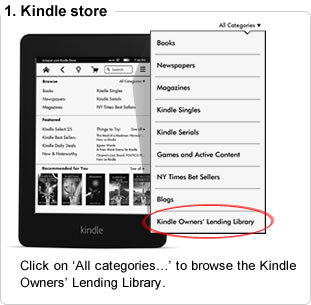
'   It is accessible in several ways but the easiest one is to get to the Kindle Store and click on BROWSE / "See all" ...

  and then when I press Menu, I get the Menu they show, which has "Kindle Owners' Lending Library" option at the bottom.

  When I click on that, each book has "Prime" showing at the right.  For me, non Fiction is the thing but I can't choose that on this "All" (books) page.

  The resulting lending list is too long to browse, at 5000+, so I chose an option in small print at the upper right, "View Subcategories" ...

  Then I clicked "Biographies and Memoirs" and after getting the smaller list (only a couple of hundred), I then clicked on a book that looked interesting.  That showed me a "BUY" button, an "or" and then "Borrow for Free" for 'Prime Members Only'

  Clicking on "Borrow for Free" caused the book to be sent to me.

My Kindle 2 is powering up because I had not touched it for about 2 months and I'll let you know what I see on that but I won't be on my computer for another 8 hours.

Try going to Kindle Community forums and ask there what other Kindle-2 members are finding if what I detailed above doesn't work for you.

Good luck! Contrary to my expectations I see more books there of interest to me than I thought there would be and I don't have to deal with umpteen other people having it 'out' as I do with the public library ones :-)

Like Tom, I love the "no due date" aspect too as the book would be lower priority for me to read than ones I have paid for recently, in most cases - though I see one I want to read right away actually.
Maybe I'll post this as a general followup... '
(...which I just did)

Hope that helps...

Note - The above explains how to Borrow a book, only possible from the Kindle.
  But remember that you can otherwise Browse Prime Lending Kindle books on the Web when you're just looking, by going to http://amzn.to/kprimebooks.  Unfortunately, the Search link includes non-loanable books, which are not borrowable, but you can use the box at the right - above the listing- to choose Low to High pricing after you get your search results and that will help.


Check often: Temporarily-free recently published Kindle books
  Guide to finding Free Kindle books and Sources.  Top 100 free bestsellers.  Liked-books under $1
UK-Only: recently published free books, bestsellers, or £5 Max ones
    Also, UK customers should see the UK store's Top 100 free bestsellers.

  *Click* to Return to the HOME PAGE.  Or click on the web browser's BACK button


Below are ways to Share this post if you'd like others to see it.
-- The Send to Kindle button works well only on Firefox currently.

Send to Kindle


(Older posts have older Kindle model info. For latest models, see CURRENT KINDLES page. )
If interested, you can also follow my add'l blog-related news at Facebook and Twitter
Questions & feedback are welcome in the Comment areas (tho' spam is deleted). Thanks!

Wednesday, November 2, 2011

Prime's KINDLE OWNERS LENDING LIBRARY w/ NYT bestseller books - *UPDATED with details and caveats* - Update2

KINDLE OWNERS LENDING LIBRARY WITH NY TIMES BESTSELLERS, FOR PRIME MEMBERS

The title is in caps, because I really didn't expect the Kindle Owners Lending Library program would actually be put into effect, knowing how stubborn some publishers are about allowing even public libraries to lend their e-books.  But those particular publishers may not be involved in this lending library either.  We'll see. [ See Update below, added same night. ]

Also adding Gizmodo's realistically cynical, yet upbeat take on this, calling it, despite noting what it lacks, "Officially the greatest deal in Tech" and "the smartest digital ticket around."
  Also see the steps taken when borrowing a Prime book.

  I'm posting the news first and can add more details as we learn them later on.  I did just tweet this news as it's quite a coup, at least in my view.  And the Kindle Fire IS considered a Kindle device for this.


UPDATE for more details and caveats
The Wall St. Journal's Jeffrey A. Trachtenburg and Stu Woo have some salient info on all this, from talks with Amazon and publishers.  Points made (bold facing mine):
1. Slightly more than 5,000 titles will be involved.

2. NONE of the 6 largest publishers in the US is participating ("Big6" who have been driving up prices and who have fixed them to be the same at all e-bookstores dealing with them, two of whom refuse to offer e-books to public libraries).
  The WSJ guys say:
    Several senior publishing executives said recently they were concerned that a digital-lending program of the sort contemplated by Amazon would harm future sales of their older titles or damage ties to other obok retailers."

3. The program "cannot be accessed via apps on other devices, which means it won't work on Apple Inc's iPad or iPhone, even though people can read Kindle books on both devices.  This restriction is intended to drive Kindle device sales, says Amazon.

4. Getting people to join Prime is a focus.

5. While e-book borrowing at public libraries had been rising 10% to 15% a month, Seattle's electronic-resources librarian Kirk Blankenship said that it has risen 32% in the month after Kindle books became available.  He's not worried about Amazon starting its own lending service because "There's a lot of people that can't afford Amazon Prime.  We also want to be a resource for people looking for other things beyond the best-seller list."

6. Some e-book publishers see the program as a positive, and they quote Arthur Klebanoff, CEO of RosettaBooks LLC, who is looking forward to the incremental exposure for participating titles and feels that "all site promotion, especially of backlist titles, drives sales in the Kindle Store and so he is providing about 200 titles.
[End of update]

Amazon's announcement details
The product page says that Prime users will be able to "choose from thousands of books to borrow for free..." [which is how borrowing usually works] "...including over 100 current and former New York Times Bestsellers -- as frequently as a book a month, with no due dates.

  I'm impressed Amazon pulled this off. Their announcement makes the following points also (bold-facing is mine):
' No other e-reader or ebookstore offers such a service. With an annual Prime membership, the Kindle Owners' Lending Library is included at no additional cost.

Millions of Prime members enjoy free two-day shipping, unlimited streaming of nearly 13,000 movies and TV shows, and now thousands of books to borrow for free with a Kindle.

"Owning a Kindle just got even better. Today, we're introducing a new Prime benefit built for Kindle: The Kindle Owners' Lending Library," said Jeff Bezos, Amazon.com Founder and CEO. "Prime Members now have exclusive access to a huge library of books to read on any Kindle device at no additional cost and with no due dates."

The Kindle Owners' Lending Library offers access to a wide array of categories and genres in fiction and non-fiction, and includes popular titles such as Moneyball: The Art of Winning an Unfair Game, The Big Short and Liars' Poker by Michael Lewis, TheHunger Games trilogy by Suzanne Collins, and Water for Elephants by Sara Gruen --plus award-winning books such as The Finkler Question and Guns, Germs, and Steel, memoirs such as Anthony Bourdain's Kitchen Confidential, and motivational books like The 7 Habits of Highly Effective People.  Just as with any other Kindle book, your notes, highlights and bookmarks in borrowed books will be saved, so you'll have them later if you purchase or re-borrow the book.

  Books are borrowed from a Kindle device, and customers can have one book out at a time.   When customers want to borrow a new book, any borrowed book can easily be returned right from their device.

Titles in the Kindle Owners' Lending Library come from a range of publishers under a variety of terms.  For the vast majority of titles, Amazon has reached agreement with publishers to include titles for a fixed fee.

  In some cases, Amazon is purchasing a title each time it is borrowed by a reader under standard wholesale terms as a no-risk trial to demonstrate to publishers the incremental growth and revenue opportunity that this new service presents.

"The Kindle Owners' Lending Library is a great new benefit for Kindle owners and an entirely new growth opportunity for authors and publishers," said Russ Grandinetti, Vice President, Kindle Content. "With the growth in Prime membership and the recent addition of Prime Instant Video, we've been able to broaden our relationships with movie and TV studios such as CBS, Fox, and NBCUniversal and significantly increase their revenue. We're excited to expand that investment to books - with this launch, we expect three immediate results: Kindle owners will read even more, publisher revenues will grow, and authors will see larger royalty checks."

"We're excited to offer titles from our ebook 'Chapters' series, which covers some of the world's most popular destinations, to members of Kindle Owners' Lending Library," says John Boris, EVP Lonely Planet. "Our ebooks have done incredibly well on Kindle and this is a great way to showcase our travel expertise to an even broader audience."

"We're excited about any program that helps readers discover our authors and their books," said David Nussbaum, Chief Executive and Chairman of F+W Media Inc. "We think this will lead to more people reading F+W's books, and more profit for our authors." '

To Learn More About the Program
Amazon adds that to learn more about the Kindle Owners' Lending Library, visit the Kindle Owners Lending Library page.  [Link: amzn.to/kindleownerslendinglibrary ] [ShortLink: amzn.to/kollprime ]  To learn about all of the additional benefits included with Amazon Prime, or to start an Amazon Prime free trial visit the Amazon Prime page. [Link: amzn.to/primebooks ]

Also be sure to read their Kindle Owners Lending Library help pages for all the details and fine print.
  For instance,
  1. "If you have already borrowed a book in that calendar month, you are not yet eligible to borrow a new book until the next calendar month."

    So I can't experiment much, as I could return the book I borrowed but I won't be able to borrow another one until December on that account.  My Kindle 2 on that account isn't allowed to borrow as I've reached my limit for the month, the Kindle Store tells me when I tried to get one with the Kindle 2.

  2. You CAN share that borrowed book with the other Kindles by going to your "manageyourkindle" page and sending 'copies' to the other Kindles to read.

The restrictions make sense to me, as Amazon is a store and "for profit," rather than a non-profit library.  And authors need support (most publishers too).  But as a non-fiction fan, I'm already chafing at the bit as I saw a couple of other e-books I'd like right away.  Not good for impulse buyers, so I'll contain myself.


UPDATE2 - You can browse, at Amazon, the 5,000+ Kindle books that are lendable under the PRIME Kindle Owners Lending Library program.  There are several sorting methods available at the upper right with genres and subcategories at the left!  I explain more about this at my original blog article on the easier-to-browse listing.


Check often: Temporarily-free recently published Kindle books
  Guide to finding Free Kindle books and Sources.  Top 100 free bestsellers.  Liked-books under $1
UK-Only: recently published free books, bestsellers, or £5 Max ones
    Also, UK customers should see the UK store's Top 100 free bestsellers.

  *Click* to Return to the HOME PAGE.  Or click on the web browser's BACK button


Below are ways to Share this post if you'd like others to see it.
-- The Send to Kindle button works well only on Firefox currently.

Send to Kindle


(Older posts have older Kindle model info. For latest models, see CURRENT KINDLES page. )
If interested, you can also follow my add'l blog-related news at Facebook and Twitter
Questions & feedback are welcome in the Comment areas (tho' spam is deleted). Thanks!

Wednesday, September 28, 2011

Kindle Fire - a bit more (which means quite a lot of things) - Update2

A QUICK LOOK AT THE KINDLE FIRE

I'll add to this blog article later.
Now that things have settled down some, here are some additional facts on the Kindle Fire 7" tablet (isn't it odd this is not just another Rumor story and that Amazon actually announced this?)

  Except that there's no SD slot nor functional USB port (except for cabled access), what it IS able to do, otherwise, has exceeded my own expectations for a speedy $200 device.

  First I was glad to see it was a dual-core processor instead of the almost insane-sounding single-core processor suggested in the earlier hands-on that Tech Crunch had and that the screen resolution is 1024 x 600 resolution at 169 ppi, with IPS (in-plane switching) technology (it should be beautiful on this size screen), AND anti-reflective treatment (which works well for the NookColor I have)

  It's not even a pound, at 14.6 ounces.

  Unlike the 6 GB storage guessed earier during the Tech Crunch hands-on that was given, it's 8GB internal, enough, Amazon says, for 80 apps, plus either 10 movies or 800 songs or 6,000 books.
  As mentioned before, it could be that Amazon was lowering expectations when Tech Crunch received that unit.

  Most of us would like 16-64 gigs but the Cloud technology focus along with Amazon's Silk web browser feature that lets the Cloud do half the work in presenting your content promises a Cloud-accelerated experience on the Web.

  Adobe FLASH player is directly supported. (Most know that a primary tablet doesn't support it.)

Update1 The image at the right is from Engadget's photo gallery yesterday, and I was struck that, taken from the side, the image is very solid, with all the overhead lights.  Normally these won't photograph well from that angle. {End Update1]

The Speakers are top-mounted for once, so maybe we can hear the content rather than let the desk absorb it.   Audible Enhanced (AA, AAX) is supported, as are DOC, DOCX, the usual image files, and non-DRM AAC, MP3, MIDI, OGG, WAV, MP4, VPB.

  The warranty is 1-year Limited (will need to look at what that means). Optional 2-year extended warranty.

  *BUILT-IN EMAIL* app "that gets your webmail (Gmail, Yahoo!, Hotmail, AOL etc) into a single inbox." You can import your messages and contact lists from other email accounts. Additional email apps are available in the Amazon Appstore.

  FREE PRIME TRIAL for one month. That gets you 10,000+ commercial-free  movies and tv shows (not the most current ones) and free 2-day delivery on Amazon orders.
  It's $79/year after that, something under $7/month.  Students are eligible for Prime, at half that price, currently.

  Amazon offers now over 100,000 streaming videos, including NEW releases and current TV shows (for a price of course but it has been less expensive than most places that do single item sales).

  Amazon has 800,000 book titles at $9.99 or under as well as there being over 2 million free, out of copyright, pre-1923 books also available to the tablet, as many know.

 They now have over 1000 "beautifully-illustrated children's books" (NookColor had the lead on that one).

  FREE CLoud Storage for your Amazon digital content. That's for all books, movies, music and apps purchased from Amazon. 5 gigs of cloud storage for each customer, globally, have come free for some time -- it's about $1/mo. more for each gig beyond that.  Amazon digital purchases never count against the maximum storage selected. So, of course they're banking on customers buying more from Amazon.

Extra Durable Display
Amazon calls this  their "state-of-the-art" Kindle Fire display -- "chemically strengthened to be 20 times stiffer and 30 times harder than plastic, making it extra durable and resistant to accidental bumps and scrapes.

Amazon's Whispersync technology -  "automatically sync your library, last page read, bookmarks, notes, and highlights across your devices."

On Kindle Fire, Whispersync extends to video.  Start streaming a movie on Kindle Fire, then pick up right where you left off on your TV - avoid the frustration of having to find your spot.  Here is more information on Kindle Whispersync

Update2 - CAVEAT - 3G:  Although the iPad did not have a cellular network 3G model for a few months when it was first released, Amazon Kindle users are used to being able to access the Net with free (very slow e-Ink-style) 3G web browsing and that has worked well for me for Net lookups when out and about.  I don't do data contracts for my phone as it's not worth it for me.

  This first Amazon tablet, like the first iPad, also does NOT have 3G network access. So if you are not near a local WiFi network, you won't be able to access the Net, much less that Cloud and its Amazon Silk browser service.

  You saw above how many videos or books will fit on the device locally -- 80 apps plus "10 movies" (that could NOT be at HD size though) "or 800 songs or 6,000 books" -- you would view those without a Net connection

  However, you will also be able to store your videos on Amazon's Cloud storage and redownload them as needed for offline viewing.  While there is basic storage given for any customer, it's "only" 5 gigs/yr but any movie, music or books bought from Amazon will get free storage that doesn't count against storage limits.

  At one point they offered unlimited storage (in a year) for all your music received from anywhere, in addition to storing other files within the max) for $20/yr and I wouldn't be surprised if they make similar offers for the Kindle Fire.
  I'll keep a watch on those, as usual though, to make sure people are aware of that type of promo.  While Kindle users had little reason to care about music or video storage, that'll be different for the tablet. [End of Update2]

Will look over more carefully the other new devices and update the pages on this site also.

Attached is the usual footer that shows what types of book-buying deals exist at Amazon -- and the Kindle 3 keyboard models and the larger DX Graphite are still for sale and in-stock, for those who don't want touchscreens.


Kindle 3's   (UK: Kindle 3's)   K3 Special ($114)   K3-3G Special ($139)   DX Graphite

Check often: Temporarily-free late-listed non-classics or recently published ones
  Guide to finding Free Kindle books and Sources.  Top 100 free bestsellers.  Liked-books under $1
UK-Only: recently published non-classics, bestsellers, or £5 Max ones
    Also, UK customers should see the UK store's Top 100 free bestsellers. Below are ways to Share this post if you'd like others to see it.
-- The Send to Kindle button works well only on Firefox currently.

Send to Kindle


(Older posts have older Kindle model info. For latest models, see CURRENT KINDLES page. )
If interested, you can also follow my add'l blog-related news at Facebook and Twitter
Questions & feedback are welcome in the Comment areas (tho' spam is deleted). Thanks!

Thursday, July 15, 2010

College student at home? Amazon Prime free for 1 yr for students

The Amazon Prime program's special offer for college students has been in the news for over a week and I felt it was a good way for Amazon to get college students to spend more money shopping at Amazon for their school and other needs :-)

And of course it is, since anyone with free 2-day shipping at an online store will favor that store for purchases.  A Win-Win, when you know that Prime usually costs the customer $79 a year ($6.58 per month).  At that normal rate, customers will buy more just to justify spending that much for shipping each month (when free supersaver shipping is often available for the ever patient), unless they already easily spend more than that as frequent purchasers who don't like to wait several ground-delivery days for UPS or USPS.

  As most Amazon shoppers know, especially those who feel they can't or won't afford it, Amazon Prime is the special shipping-feature plan that offers free 2-day shipping on most Amazon products or one-day shipping at a much lower rate than usual ($3.99). You are able to include 4 members of your household for that $79/yr as well.

  3rd party seller products often don't qualify for this program but I've been surprised lately to see some larger or more popular third-party stores participate in the Prime program.

Basically the Student Prime features for the free annual-rate offering, are:
Amazon Prime free for one year ($79 value)
  . Unlimited FREE Two-Day Shipping on textbooks and millions of other items
  . No minimum order size
  . Upgrades to One-Day shipping for $3.99/item
E-mail alerts for exclusive deals and promotions
It's free for students - sign up by providing your school and major

The Email alerts are not optional.  The student can say No to that but then they're not eligible for this free version of the program.  Fair enough, I'd say.

To qualify for this, the student must have a mailing address ending in ".edu" and provide a Major when signing up - the wording also says you should be "enrolled" in at least one course at the college.
  The terms agreed to include that further eligibility information may be requested.


College students can of course be current Amazon customers and they just provide the '.edu' email address and identify a Major to become eligible.  The .edu address is for the E-mail alerts for exclusive deals and promotions.

  Now, how Amazon 'sees' you as eligible for prime or not may depend on using that email address for purchases too, unless Amazon links your .edu address to your main email address for log-ins there.

 Here are two good bits of information from their Student FAQ:
' If you're already an Amazon Prime member, you can still sign up for Amazon Student if you are eligible.  After you sign up for Amazon Student, we ll refund you the remaining months left on your current Amazon Prime subscription.

When you sign up for Amazon Student, you'll receive e-mail alerts for discounts and promotions.  If you don't want any more Amazon Student e-mails, you may cancel your Amazon Student membership.
 If you do this, your Amazon Prime benefits will also end when the membership is canceled '

  They have been refunding the remainder of the regular Prime term subscription fee upon confirmation of a student's .edu email address.

  Amazon states the exclusive discounts and promotions will also be made available on the Amazon Student membership page.

What's not entirely clear is whether a student Prime account gets the normal benefit of including four other members of a household in that plan.  The Student FAQ page doesn't exclude this benefit.  All I've found so far is "We sometimes offer certain customers various trial or other promotional memberships, which are subject to these Terms except as otherwise stated in the promotional offers."  That's from the regular Amazon Prime Terms.

The Student Prime Sign-up page does, however, say that students will get the Amazon Prime package as described at their regular Amazon Prime FAQ page, which is directly linked as the package they're offering college students for free (currently).

To make sure you get the Amazon confirmation/certification mail, follow their advice here:
"To prevent Amazon.com's e-mail from going to your spam or junk folder, add amazon-student@amazon.com to your contacts or safe list."

Reference Pages:
Student Prime signup
Student Prime FAQ
Amazon Student page
Regular Amazon Prime FAQ
Regular Amazon Prime Terms & Conditions
Prime household-sharing instructions.


(For non-college students who might be interested in regular Prime, Amazon states: If you haven't been an Amazon Prime member in the last 13 months, you can sign up for a free trial.

Image Credit: log.galloinspires.com Below are ways to Share this post if you'd like others to see it.
-- The Send to Kindle button works well only on Firefox currently.

Send to Kindle


(Older posts have older Kindle model info. For latest models, see CURRENT KINDLES page. )
If interested, you can also follow my add'l blog-related news at Facebook and Twitter
Questions & feedback are welcome in the Comment areas (tho' spam is deleted). Thanks!

Sunday, February 14, 2010

The Motley Fool on Apple's $15 e-book price plan / Free Kindles?

The Motley Fool is a website that gives investment advice.
  Wikipedia says of Motley Fool: "According to Mark Hulbert of The Hulbert Financial Digest,  for the past five years the brothers have earned an average return of 22%, annualized, versus a comparable return of 7% for the Wilshire 5000."

  The Wikipedia article also points out that in 2003, The Motley Fool Investment Guide was called the "#1 All-Time Classic" by investment club members of the NAIC

A couple of days ago, they posted a column by analyst Rick Munarriz, titled Don't Put Up With a 50% Price Hike."

Some choice excerpts (they don't mince words at that site):
' The e-book revolution is about to be tested. Now that Amazon.com (Nasdaq: AMZN) has apparently caved to one publisher's request for higher selling prices, the days of $9.99 digital best-sellers may be numbered.

Apple (Nasdaq: AAPL) has to be loving this.   It's the one that has been feeding publishers with dreams of pushing e-books for $12.99 to $14.99 a pop when its iPad comes out in a few weeks.

It's a brilliant move on Apple's part.  No one is going to pay at least $500 for an e-book device.  If the iPad succeeds it will be because it's a jack-of-all-leisure-trades...

Apple's new pricing, though, is a dagger to dedicated e-book readers.  Publishers will make sure that its digital reads are priced identically across platforms, and that means that it will be harder for Amazon, Sony (NYSE: SNE), and Barnes & Noble (NYSE: BKS) to market their gadgets...Buying a digital book for slightly less than a physical hardcover won't be a difficult economic decision.

The thinner the pricing disparity, the less likely that consumers will make the switch.  Bibliophiles aren't dumb.  I hear they're well read.  They will also be quick to realize that digital books can't be resold, swapped, or shared like physical reads.  This will make it even harder to justify the higher prices.

Next of Kindle
Amazon can fight back. It can reach out to newspaper companies and offer highly subsidized -- perhaps even newspaper-branded -- Kindles for folks committing to long-term digital subscriptions. [See 2nd article below.]
. . .
Ultimately, consumers will rebel.  They won't pay $14.99 unless ALL publishers play along.  Even then, there are the free public domain or nearly free indie author works put out through the store.
. . .
This doesn't mean that Apple will get away with this tricky feat.

If the digital migration of music and video taught us anything it's that CDs and DVDs got cheaper and still sold fewer copies.  Physical book prices will gravitate lower and sales will begin to shrink.  If $9.99 is the magical price point for books -- as it was digital albums -- the marketplace will make it happen. If not, say hello to the playing field leveler's little friend: Piracy.

Consumers always have the last laugh

There is no law that states that publishers need to sell digital books at the same thin margins as their leafy reads.  However, $15 for an e-book is going to be harder to swallow than a bowl of poi.
. . .
Publishers should be embracing $8-$10 price points for digital books for many of the same reasons (lack of reselling, swapping, or permanent sharing) that will drum up incremental sales.  It's also hard to deny the huge costs savings of not having to print, ship, and gobble back returns on physical books.

If the publishers don't get it now, readers will let them know.

However, the move to inch prices higher after Amazon has already sold millions of Kindles isn't right.  Folks will rebel.  Apple may laugh now.  Real world superstores Borders (NYSE: BGP) and even Nook daddy Barnes & Noble may be chuckling on the sidelines.

But it won't end that way: Amazon -- and more importantly e-book readers -- will have the last laugh here. '

FREE KINDLE WITH AMAZON PRIME BEING CONSIDERED??
The TechCrunch article by Michael Arrington of CrunchPad infamy has been reposted by what seems hundreds of blogs and tweeters.  The article is based on information from "A reliable source " that Amazon "wants to give a free Kindle to every Amazon Prime subscriber," once they "work out how to do it without losing money."

Yes that could be an obstacle.  One clue is that in the earlier trial, in which they gave heavy Amazon buyers a chance to buy the Kindle but KEEP it for a full refund if they didn't like it, they chose what some called "best customers" and in that case it included having bought many books from Amazon, showing an interest in reading.

The article explains:
' Amazon Prime is a subscription product that gives customers free two day shipping on everything they buy from Amazon. The current fee is $79/year.  

These are Amazon’s very best customers – the ones who tend to make multiple purchases per month.  And they are also likely to buy multiple books per month on their Kindle devices.  If those users buy enough books, and Amazon gets the production costs of the Kindle down enough, Amazon can get Kindles into “millions” of people’s hands without losing their shirt.  At least when the goal is to break even or better over the course of a couple of years, the expected lifetime of a Kindle. '
My first thought a few days ago was what a good idea it might be to leak this, as many might join Prime right away and I wasn't sure I wanted to contribute to that.  After a couple of days, I felt it is probably worse to not even mention the possibility, so here it is.  On the Amazon forums, customers are saying they'd love to have another Kindle for the spouse, family, etc.  In that case they'd be sharing e-books on one account often, so that's probably not the ideal situation for Amazon, for almost giving away the device.

As for the Prime membership feature, "Up to four household members may share this membership."  The normal free-trial period is one-month but they sometimes offer a longer trial to those who buy a lot.  Other aspects of it are explained under the Amazon Prime FAQ there.  But I would not get one just because an unnamed source said that eventually a free Amazon Kindle might come with it.  The plan makes sense for heavier buyers who want their products right away.  It would not be ideal for people who buy only e-books from Amazon :-).

 Still, if they can swing this somehow, it'd be nice, though I guess some large publishers and competitors wouldn't agree. Below are ways to Share this post if you'd like others to see it.
-- The Send to Kindle button works well only on Firefox currently.

Send to Kindle


(Older posts have older Kindle model info. For latest models, see CURRENT KINDLES page. )
If interested, you can also follow my add'l blog-related news at Facebook and Twitter
Questions & feedback are welcome in the Comment areas (tho' spam is deleted). Thanks!

[Valid RSS]