Showing posts with label kindle dx. Show all posts

Wednesday, October 13, 2010

Kindle News, lots of it, 10/13/10

The 11 items mentioned below include a few that are mainly links w/short descriptions for those interested in following the links, as there is a lot of news this week and you can follow these when you have time.  The others probably contain too much information but I wanted to see community responses to some of the news.


1. STAPLES

Staples's display area for the Kindles.  Note the larger Kindle on the desk?  I didn't THINK they have the DX Graphite in stock but it was said that they'd be in stores in November.

  At this point, they only have pre-programmed demo models although they call them "interactive"... the article drips with sarcasm, but I wish Amazon felt they could afford to have one model in each store that people could actually try for an idea of how the Kindle  (UK: K3) actually functions.

  In the article's Comments area, someone writes back in similar vein but with a different viewpoint:

  "I got my grubby paws on one of these devices last year, and actually quite liked it.  I found out that you can use the free 3G internet access to surf the web, anywhere on the planet that has 3G cellphone coverage.
  Oh, and apparently you can read books on them as well. "

2. COWEN AND CO.'S DIGITAL BOOK MARKET SURVEY
The L.A. Times Entertainment blog reports on estimated sales based on a survey by Cowen and Co.:
' Not only are sales of the Kindle device expected to grow 140% this year to nearly 5 million units from 2009, but digital book sales via the Kindle store are on track to grow 195% to $701 million in 2010, according to Cowen and Co., which released a report Monday on the digital book market.

...according to the report, written by Cowen analysts Jim Friedland and Kevin Kopelman. "In fact, we think the adoption of tablets will boost Kindle e-book sales."

...For 2010, Cowan estimates Apple will have 5% of the market for digital books, compared with Amazon, which is projected to have 76% of the market.  But by 2015, Cowan estimates Amazon will have 51% of the market and Apple with 16%.

3. AMAZON SINGLES
When I first saw the PR release at MarketWatch, I thought Amazon was expanding into the Dating-Services area, but instead:
' Less than 10,000 words or more than 50,000: that is the choice writers have generally faced for more than a century--works either had to be short enough for a magazine article or long enough to deliver the "heft" required for book marketing and distribution.

But in many cases, 10,000 to 30,000 words (roughly 30 to 90 pages) might be the perfect, natural length to lay out a single killer idea, well researched, well argued and well illustrated--whether it's a business lesson, a political point of view, a scientific argument, or a beautifully crafted essay on a current event.

Today [Oct. 12], Amazon is announcing that it will launch "Kindle Singles" -- Kindle books that are twice the length of a New Yorker feature or as much as a few chapters of a typical book.  Kindle Singles will have their own section in the Kindle Store and be priced much less than a typical book.
  Today's announcement is a call to serious writers, thinkers, scientists, business leaders, historians, politicians and publishers to join Amazon in making such works available to readers around the world.

  "Ideas and the words to deliver them should be crafted to their natural length, not to an artificial marketing length that justifies a particular price or a certain format," said Russ Grandinetti, Vice President, Kindle Content.  "With Kindle Singles, we're reaching out to publishers and accomplished writers and we're excited to see what they create." '

Nick Bilton of the NY Times points out that
' This medium-length format has traditionally been difficult for writers to sell to publishers as it doesn’t fit into the mold of a printing-press distribution model.

  In a digital distribution system, those pricing structures no longer exist, and a digital price can be adjusted accordingly.

  By promoting this new format, Amazon can also avoid upsetting publishers who were frustrated with the company when it introduced its own self-publishing product, allowing writers to price and directly sell their content on the Kindle platform. '

Engadget's Joseph L. Flatley refers to these as "really, really short books"

  To Engadget's mostly tongue-in-cheek analysis - "It looks like Amazon has finally admitted what we knew all along: most books are too long. And boring.
  We need more e-publications that reflect our torn jeans, frayed hair, coffee swilling, ca. early-1990s slacker lifestyle.
  Kindle Singles, as announced by "the man" in an ironic blast of "PR," are described as e-books anywhere from twice the length of a Maximum Rock'n'Roll feature article to a few chapters in a typical book...."

  In the Engadget comments area, Nick Sweetman writes:
' Have you ever heard of this thing called attention span? It's when you actually get to '

  IMHo predicts:
' Mark my words: in 2020 they will come out with Kindle Fractions, for page-and-a-half publications, because by then singles will be considered long and boring :) '

  And, on a more serious note, jtnoel adds:
' Amazon is one of Dime Novel Publishing's distribution channels.  In fact, we currently have close to 30 titles published (although Amazon does not provide publishers the ability to offer texts for free...unless you are one of the big guys).

  The issue is about getting noticed. Publishers pushing short/serialized content through Amazon are, in short (no pun intended), lost in the shuffle.  By breaking this out into its own model, there is a great opportunity for authors/publishers like us to get some real marketing push from Amazon. '

 Dingus is amusing:
' The "Amazon Singles" name is all about branding.  Because calling them "Amazon Short Stories" sounds like a comic from the '50s.
  Also the acronym might not fly. '

 And, on a note that might please Amazon and Singles-authors, Mark points out why this might work:
' There are probably a lot of awesome short stories by authors I love, that I don't read.  Why?  Because I don't want to buy compilations with other short stories I am not interested in reading. '

zippycart.com makes some good points:
' ...Others view Kindle Singles as a new revenue source [for writers].  Writers can now take a different approach, and create smaller books that have a more narrow focus.

  It might take a year to write a traditional book, but Kindle Singles could be easily produced in two weeks to a month.  This quick turn around time could allow writers a chance to sell more digital work, so they can have the money to allow them to spend time focusing on bigger books.

  Other writers, on the other hand, may look at this as a new opportunity to carve out a unique niche, where they produce dozens of 30 to 90 page books.   Either way, this new addition to the Kindle Store provides a great deal of opportunity for many. '

Technorati's Laura Zavelson writes:
' If viewed through a magazine/newspaper lens, this could be the first step in letting journalists and writers produce their own work rather than having to be on staff or go through the tedious pitch process.  While the press release did not discuss the business model, there is also the possibility that writers might even be able to earn more for their work by going straight to distribution and bypassing the publishers.

  ... The newsstand price of a top consumer magazine runs about $5. What if you could spend less and just buy the articles you're interested in?  Would you do it? '

4. ZORK FOR KINDLE AGAIN
Geek.com's John Brownlee writes that while he feels the Kindle is 'worthless' for any games (of the action type, definitely), Zork is another matter:
' Given how extremely dedicated and talented the text-adventure community is even today, this seems like an absolutely wonderful development for the Kindle, transforming it from an e-reader into an affordable handheld console for a type of game not really supported on other systems.  Roll out support for A Hitch-Hiker’s Guide To The Galaxy and I’m there. '

5. AMAZON TO SELL KINDLE IN CHINA?
In an article in Investor's Business Daily, by Doug Tsuruoka, about Amazon and sales of mooncakes! in China, I saw this:
' Amazon operates under the name Joyo Amazon in China.  Market research firms in China say Amazon is doing well selling books.  There are unconfirmed reports in the Chinese press that Amazon will soon start selling its Kindle e-book reader in China. '

Probably true.  In the July 28 blog entry, I wrote that the Global Times, China reported that
' Despite claims by Amazon that its E-book reader, Kindle, has no timetable for entering the Chinese market, its Chinese branch, Joyo, is in what is believed to be preparations to launch the device, media reports said Wednesday.

  An industry insider disclosed that Joyo has initiated recruitment of distribution managers and personnel via recruitment organizations, which leads industry analysts to believe this is a prelude to launching.  Information on talent-recruitment is available on Joyo's official website. '
And a couple of days later came the news that the new Kindle now handles Chinese characters.

6. QUALCOMM'S MIRASOL DEMO AT AMERICAN MAGAZINE CONFERENCE
ChicagoNow's yearley reports that the color but e-paper-like Mirasol display (that can do video) for future e-readers was demo'd at American Magazine Conference.  The part that most interested me, in a long article explaining Mirasol technology, was this:
' The Mirasol is a "color display that future E-Readers will be able to integrate for a different viewing experience from the present offerings...There is currently a dedicated fab facility, special factory that produces the displays, in Taiwan which increases its production reach and will be able to supply demand given a deal is reached soon for an E-Reader... [Emphases mine, as usual.]

The display can show images and video as a clear XGA format at 1024 x 768 screen resolution with 223 pixels per inch.

...The final question on everyone's mind is perhaps what E-Reader devices the Mirasol display might be a part of in the near future and if it will be in other mobile devices besides E-Readers.  However, that was the one question that could not currently be answered and [they] were not able to say at the present time to anyone.  Though currently Qualcomm is in the process of working on deals with major players in the E-Reader market.

The CEO of Barnes & Noble was present at the American Magazine Conference, so perhaps he caught onto some ideas after previewing the Qualcomm Mirasol display and will decide to bring it to the Nook, along with Mirasol's full color and video capabilites. '

See far more info on this promising (but muted-color) display at ChicagoNow.

7. TOM'S HARDWARE WEBSITE NOW IN KINDLE BLOG EDITION
Kindle Edition of Tom's Hardware mobile The popular and highly-regarded "Tom's Hardware" site is now available in a Kindle Edition for 99 cents a month.

8. AMAZON AND BEST BUY WORKING ON TABLETS?
Yet another rumor, this time from androidandme.com, about a possible Amazon tablet in the works (I'd not mentioned any of the other Amazon tablet rumors).

  They point out that
' TechCrunch "was the first to post the rumor that an Amazon tablet was coming and it makes perfect sense when you really think about it. Amazon’s site attracts nearly 80 million visitors each month and they have demonstrated their ability to move a branded device like the Kindle e-reader. If Amazon takes their moneymaking Kindle brand and slaps it on an Android tablet, they now have the perfect mobile platform to push their growing video-on-demand library, while also using their killer recommendation engine to sell apps and games. '

Just a rumor and not a strongly-based one though it makes sense it might happen someday.  And Amazon's Lab126 has had job postings for positions requiring experience in video and animation.

9. RELUCTANT EBOOK ADOPTER DETAILS HOW HE FELL FOR THE ENEMY
How I got a preview of the Kindle 3 – and totally geeked out - by Christopher Sutton, a "reluctant ebook adopter."  The link for this delightful read was tweeted to some Kindlers by @mikecane.

It's a long piece by a guy who's always loved physical books and strongly resisted the idea of an e-reader (does this sound familiar?).  He explains his slow turnaround, to the extent he wound up in the new Amazon video, "What Customers are Saying".  Seen just under "The Reviews Are In -- where this link takes you, though it takes a bit to load -- the video also includes a couple of appearances by Jesslyn who runs the information-focused blog My Kindle Stuff - Info, How-To & Book Resources at http://mykindlestuff.com.

10. FOR EDUCATORS - a recommended article
The Chronicle of Higher Education's Jeffrey R. Young asks, As Textbooks Go Digital, Will Professors Build Their Own Books?.  It wouldn't be that easy, for many reasons.

11. GOOD READING ON THE FUTURE OF THE PUBLISHING INDUSTRY
BookBotics - The Future of Publishing, at http://www.ebookbotics.com/
  "BookBotics features commentary and analysis about the future of books, reading and publishing business models in an era of digital media and convergence technologies.  While BookBotics focuses on these issues in particular, it also provides information on legal issues in the publishing industry as well as the many technological developments and curiosities that have become part of our digital culture."


Kindle 3's   (UK: Kindle 3's),   DX Graphite

Check often: Temporarily-free late-listed non-classics or recently published ones
  Guide to finding Free Kindle books and Sources.  Top 100 free bestsellers.
    Also, UK customers should see the UK store's Top 100 free bestsellers. Below are ways to Share this post if you'd like others to see it.
-- The Send to Kindle button works well only on Firefox currently.

Send to Kindle


(Older posts have older Kindle model info. For latest models, see CURRENT KINDLES page. )
If interested, you can also follow my add'l blog-related news at Facebook and Twitter
Questions & feedback are welcome in the Comment areas (tho' spam is deleted). Thanks!

Tuesday, August 31, 2010

Staples to sell Kindle 3's and DXG this Fall in 1500+ stores

Staples will carry the three current Kindle models starting this Fall, which is just about here, and there is one store about 3 blocks from where I am.

  It's all over the news but I first heard it from an anonymous commenter at this blog, and I think it's great news.

  They have knowledgeable computer and electronics staff there, which will be a benefit for customers.

  In other news, Borders' Kobo reader has lowered its price to $129.  You can search 'kobo' at the top right here to get previous articles here about the Kobo reader.

  Wall St. Journal story on Borders and Kobo is here.


Kindle 3  (3G/WiFi or WiFi-only) (UK: Kindle 3),   DX Graphite

Check often: Temporarily-free late-listed non-classics or recently published ones
  Guide to finding Free Kindle books and Sources.  Top 100 free bestsellers.
    Also, UK customers should see the UK store's Top 100 free bestsellers. Below are ways to Share this post if you'd like others to see it.
-- The Send to Kindle button works well only on Firefox currently.

Send to Kindle


(Older posts have older Kindle model info. For latest models, see CURRENT KINDLES page. )
If interested, you can also follow my add'l blog-related news at Facebook and Twitter
Questions & feedback are welcome in the Comment areas (tho' spam is deleted). Thanks!

Friday, December 18, 2009

Brief: PVI (eInk) develops plastic screen, for Spring 2010

E-Ink plastic screen coming.  Financial Time's Peter Marsh in London reports today that Prime View International (PVI), who bought eInk, plans to launch a lightweight plastic screen in Spring 2010, available to all its customers, and it's thought that there's a likelihood Amazon could be involved already.
  This will be 9.7-inches so would be useable in a new Kindle DX and most important for the educational market due to the higher probability of dropping a unit in that environment.  It would be more competitive with the coming Plastic Logic 'Que' also.

PVI "refused to disclose" whether or not they're working with a specific partner on a new version of the system.  A 9.7" screen based on plastic would likely "...weigh about 330g, about a third less than the 500g or so of a product based on a glass screen."
  If that link doesn't present the full story, here's an alternate one. Below are ways to Share this post if you'd like others to see it.
-- The Send to Kindle button works well only on Firefox currently.

Send to Kindle


(Older posts have older Kindle model info. For latest models, see CURRENT KINDLES page. )
If interested, you can also follow my add'l blog-related news at Facebook and Twitter
Questions & feedback are welcome in the Comment areas (tho' spam is deleted). Thanks!

Sunday, September 27, 2009

Bits and pieces - 09-27-09 - Update

Lots of news this last week.  Catching up here...
UPDATE 9/28/09 to add alternative smaller photos of the Kindle DX screen.  See bottom of this blog article for the smaller ones.

Len Edgerly's The Kindle Chronicles podcast continues with its weekly good stuff, and the last two weeks brought us a couple of really fun, interesting interviews.

 Friday's interview: Brad Stone.
  "Brad Stone, technology reporter in The New York Times’s San Francisco bureau, talks about secrecy at Apple and Amazon,  Dan Brown,  a Kindle developer apps store,  and the brilliant description his 22-year-old daughter had of his Kindle recently."

A trip to Belmont Library, Massachusetts:
  "Maureen Connors, left in photo, is director of the Belmont, Mass., Public Library.  She and Emily Smith, technology librarian, told me all about their impressive Kindle experiment on a visit I made to the library on Sept. 16."
  Len also provides video of the checking-out process for Kindles, including a mobile-light version also.

GOOGLE BRINGS US LIFE MAGAZINE, full original run 1936 to 1972
Google announced its partnership with LIFE Inc. "...to digitize LIFE Magazine's entire run as a weekly: over 1,860 issues, covering the years from 1936 to 1972."  I found out via a retweet by Jan Zlendich of the original tweet by @idigg of this great news.

 Don't miss The LIFE photography collection with its 10 million images, 97% of which were not published in the magazine.  These are all included in the Web and Image searches of Google.

FREE ONLINE TEXTBOOKS Offered by The University Press of Florida
The University Press of Florida will be offering free online textbooks and reduced-price print copies.  Nice trend!  
' The plan is to eventually provide free online textbooks for every general education class taught at any of Florida's 11 state universities, said Meredith Babb, director of the press.
  All they can do is offer the free books, Babb said. Professors can decide to adopt them or not.
  "Eight hundred dollars a semester [for textbooks] is stupid," she said. "Maybe the students will force the professors into some of these options. That would be nice." '
 Most of the textbooks are being made available in print as well, at 40 to 50% less than the prices of similar textbooks at other stores, she added.
  They also plan to make the e-books available in as many formats as possible.
  Thanks to Suzanne Preate and DigitalKoans for the tweeted information.

MICROSOFT'S COURIER TABLET
This pleasant surprise has even Apple stalwarts excited.  After stories that the Mac Tablet/iPAD will likely go for $800 next year when it is ever released, this one is likely to be not much cheaper, but Windows has always charged less, which is why it has about 95% of the business market despite the quality of the Apple offerings.

  GottaBeMobile summarizes the Gizmodo scoop with additional pictures and embeds the video, but here's the easier-to-read Youtube video of a computer rendering of what the 'tablet' may be able to do (these are inevitably smoother than the actual processes) .  It's said to be a prototype in the last stages of development.

  The Los Angeles Times's David Colker asks: "...but is it real?"
  Microsoft is coyly neither confirming or denying any of it :-).  ' "We do not comment on unreleased products," company spokesman Doug Free said. '

  The article points out that everything shown in the videoclip is done with fingers or stylus and no keyboard is shown. While the video'd tablet user is shown making many handwritten notes, handwriting recognition isn't shown in the video even though Microsoft's Windows 7 operating system is said to have handwriting recognition features.  That would be something.  This seems far down the road and if Apple does anything that it's rumored to be doing on a tablet, they may be out with theirs, supposedly, in February.


MY KINDLE DX - a bit off-topic about my new camera that took a picture of it)
  I got a new camera for a trip because I didn't want to bring two cameras as I had 3 years ago on my last trip.  This one will do the work of two.  Its megazoom lens goes from 28mm to 560mm with excellent clarity, though smaller cameras like this one with this kind of long-zoom flexibility always have a bit more noise/grain and also 'purple fringing' or chromatic aberration seen in big enlargements than the larger cameras will.  However, in-camera adjustments by the manufacturer at the time of shooting can cause other problems, and the fringing at 100% size (which is huge) is easily eliminated with the $25 PT lens utility, which is painless and amazing and sold by 'word of mouth' among photo nuts.

  I bought the older one (Canon SX10 IS), which is increasing in price these days because the new one (Canon SX20 IS) crams more megapixels into the same sized sensor and produces more noise and chromatic aberration than the older model.  This is okay with 4 x 6 photos but not as good at 8x10 and above.
  The attraction of the SX20 is its High Definition video.

  At any rate long-distance shots are amazingly clear and it gets closeups of things I cannot even see in the default wider/normal shooting settings.  If anyone reading has one of these, I saw good recommendations at dpreview.com forums (Amazon now owns dpreview.com, a fantastic site) to choose to shoot with sharpness =-1 and contrast =-1 and then you can edit afterward and wind up getting a very clean photo in the big enlargments.

  So, I took a photo of my DX at the ice cream shop to see if it could render the text and screen better than my other camera did, and it does.  It should, since it costs more. But it's better than I expected.  As you can see, the screen is extremely readable.

  UPDATE 9/28 - I was reminded that the photo I had originally put up was larger than the browser screen and when some browsers, by default, then resize-down the photo to make sure the full shot fits the screen, the resized version is barely legible.  So now I've now substituted the cropped version that you probably just clicked on above (it leaves the font size the same but cuts out the bottom of the Kindle) and a smaller, full shot which will fit a browser window.

(Apologies for all the experimenting.) Below are ways to Share this post if you'd like others to see it.
-- The Send to Kindle button works well only on Firefox currently.

Send to Kindle


(Older posts have older Kindle model info. For latest models, see CURRENT KINDLES page. )
If interested, you can also follow my add'l blog-related news at Facebook and Twitter
Questions & feedback are welcome in the Comment areas (tho' spam is deleted). Thanks!

Wednesday, September 16, 2009

Kindle Myths from news websites, No. 1

For weeks, I have seen gadget- or ereader-info sites parroting one another with inaccuracies such as actually writing that the Kindle does not allow the Kindle-user to go anywhere but to the Amazon store.
  It's not just one or two that write this, but site after site that repeats this erroneous info or writes that the Sony-store-only wireless for the coming Sony PRS-2121 will do what the Kindle wireless feature does.

  The sites I most enjoy because they are more thorough than that are Wired, Engadget, and Boy Genius.

  When a site has deleted a Comment of mine that lets them know something stated isn't actually so (quite often) and when they are holding current notes which means current readers won't see that their info is wrong, I will post some of these here.  Eventually Google.com and people looking for information on what the Kindle wireless does involve will be able to find the information then.

ZIKKER.COM ARTICLE
UPDATE: Allie Vance, noted below, re-posted an article by Shawn Oliver  (See Comments to this blog entry) but the comment I submitted to their comment box was "pending moderation."  I've since reposted the note to Shawn Oliver at HotHardware.com and reworded the below.

Last night, someone on Twitter pointed us to zikkir.com's article, a re-posting by Allie Vance, commenting on In-Stat's much-distributed article that reported that

"...current e-book owners desire email capability in the next e-book they purchase.  Longer battery life and Internet connectivity are the top two desired features among respondents who don’t currently own an e-book but plan to buy one in the next year.

Yes, I can see that.  But then the article actually says the following
' ...but by and large, today’s batch of readers only feature a few (or one) of those, and not all three.
  Take the market-leading Kindle for example.  It has integrated WWAN through Sprint, but that only enables users to download new books on the go.  Users can’t check their e-mail or surf the Web, which is evidently a real bummer to most.
WHAT THE KINDLE ACTUALLY CAN DO, WEB-WISE
  Could anything be less true? -- that the Kindle can't surf the web or allow you to check your email?  Countless Kindle forum threads include discussions on what sites Kindle users can access and how that can be very helpful when you're not at home.  I have a freely-downloadable file of mobile-optimized websites to surf more quickly.

  I also have tips on using the web browser's various modes to help the loading speed or readability of the sites.  Never mind that Amazon itself puts a pre-set bunch of web-bookmarks on for Kindle users to try.
  But cellular wireless access will be slow, and the Kindle web access is definitely for the patient.  It pays off for some of us info-grabbers on the go though.

WIRELESS 24/7 W/NO MONTHLY CHARGES, CURRENTLY (K1, K2, K3, and DX's)
That this comes with no monthly charges for now is just another plus, and Jeff Bezos has said it is a reason he set the price of the Kindle higher instead of locking people into a 2-year monthly fee on top of the unit, as is done with cell phones.
  The high cost of wireless is why the other readers don't and won't, for some time, be including web-browsing access in their e-readers as part of the cost -- not iRex at $800++, not Plastic Logic at $600-$800 as expected, and not Sony readers, including the Daily Edition due in December.

MY STILL-HELD RESPONSE ON THE ZIKKER SITE  
which shows "No Comments" currently.   [Update: 9:57 PM - it was deleted.]
" Andrys says:
Your comment is awaiting moderation.
September 16, 2009 at 4:36 am


Well, the Kindles, starting with Kindle 1 all have web browsers, though it’s impossibly slow on the Kindle 1. It is very doable on the Kindle 2 and Kindle DX and I do email on it and browse all kinds of sites to look up things when out on the streets. See some web images from my DX at
http://www.pbase.com/andrys/kindleplus

I also have tips and guides for using the web browser in more speedy fashion (it’s 24/7 free cellular access) and I use it for lookups in stores, in concerts, hearings).  Email is slow going with GMail but it’s doable and I also check yahoo mail.

On the Kindle two, I show some time with Facebook and with the Amazon forums,
at http://www.pbase.com/andrys/kindle2

Forgive the links, but since you mentioned these are wanted items but the Kindle doesn’t allow it, I needed to let you know it very much does. I also have a file for accessing mobile-optimized sites but you’ll see what I could get with the normal webpage of Engadget at the first link above.

– Andrys
kindleworld.blogspot.com
Below are ways to Share this post if you'd like others to see it.
-- The Send to Kindle button works well only on Firefox currently.

Send to Kindle


(Older posts have older Kindle model info. For latest models, see CURRENT KINDLES page. )
If interested, you can also follow my add'l blog-related news at Facebook and Twitter
Questions & feedback are welcome in the Comment areas (tho' spam is deleted). Thanks!

Monday, August 31, 2009

Kindle DX adapted for air approach plates - Update

UPDATE - 8/31/09 - Original posting 7/28/09 - 7:00 am
There is now a set of FREE approach plates offered by NACOSync.
See the UPDATE added to the end of this article.


First, this story has a video with it that shows, better than most videos have, what a Kindle DX looks like, close up, in action.  Note the much smaller Kindle 2 that is also there.


Click for larger Video

than on AVWeb site.

Gold Seal Ventures has adapted the Kindle DX for the display of air approach plates and are formally launching it at AirVenture this week, reports AVWeb's Paul Bertorelli.  Readability and storage capability were two factors.  So was, apparently, cost.

AVweb prepared the detailed video above and says "The plates are readable and relatively easy to find on the device, and although the DX itself is a little pricey at $480, AirBrief's data service promises to me [sic] more affordable than other electronic chart sources."

UPDATE 8/31/09
NACO Sync offers their set of Kindle DX approach plates.  Unlike, apparently, the ones by AVWeb, these have hyperlinks so that navigation is point and click instead of having to enter a page number.  These are in the Kindle-readable MOBI format and are free.  Information courtesy of Jason Stone.

Features:
. Approach plates have full menus
. The entire US will fit on a Kindle DX
. These are bundled by Volume. Below are ways to Share this post if you'd like others to see it.
-- The Send to Kindle button works well only on Firefox currently.

Send to Kindle


(Older posts have older Kindle model info. For latest models, see CURRENT KINDLES page. )
If interested, you can also follow my add'l blog-related news at Facebook and Twitter
Questions & feedback are welcome in the Comment areas (tho' spam is deleted). Thanks!

Thursday, August 6, 2009

McGraw-Hill to expand higher-ed content on the Kindle

Reuters carries a PrNewswire on McGraw-Hill Education's announcement today of the expansion of its strategic alliance with Amazon, to introduce the publisher's higher education content on Kindle and Kindle DX.

I see that Ed Stanford, president of McGraw-Hill Higher Education, stresses the increase in the "reach of its digital content through the Kindle DX" while Laura Porco, director of Kindle books mentions "working with McGraw-Hill to expand the selection of content available on Kindle and Kindle DX."
  Per the Reuters PRNewswire:
" In addition to the over 3,000 professional business, medical and technical titles currently available for Kindle and Kindle DX, McGraw-Hill will now be offering over 100 top selling higher education titles in business, economics, science, math, humanities, foreign languages, and social sciences. "
This is definitely good news as it's been noted that the 6 universities involved in the coming Fall session study using the Kindle DX technology (to save paper and student backs if it works well) will include offerings from Pearson Education, Cengage Learning and Wiley Higher Education.  The study's participant schools are Pace, Arizona State, Case Western Reserve, Princeton, Reed College and the University of Virginia.  There have been questions on the Kindle forums about whether McGraw-Hill textbooks would be offered.

  The focus of colleges and universities, the newswire says, is on achieving improved student retention and pass rates while lowering the overall cost of instruction. Below are ways to Share this post if you'd like others to see it.
-- The Send to Kindle button works well only on Firefox currently.

Send to Kindle


(Older posts have older Kindle model info. For latest models, see CURRENT KINDLES page. )
If interested, you can also follow my add'l blog-related news at Facebook and Twitter
Questions & feedback are welcome in the Comment areas (tho' spam is deleted). Thanks!

Sunday, August 2, 2009

Kindle DX finally coming back in stock


The Kindle DX
is now "expected to ship in 2 to 3 days."  Why did they run out for so long - small runs?  Much higher interest than anticipated?  What happens when the Fall Semester nears?

At any rate, here's a portion from a more recent review of the DX that is pretty thorough.

Brad at Sunset Lake Software reviews it from the standpoint of scientists and engineers.  Some of his comments:
" So far, I'm finding it to be an extremely useful device, with a screen that works very well for many types of documents, including scientific papers and technical manuals.  The Whispernet data connection is really cool and provides a strong differentiator for this reader versus others on the market right now...

While seeming a little too small at first, I think Amazon got the size just right.  The screen is large enough to display detailed content, yet the Kindle is still portable enough to take with you everywhere...

I tried a bunch of complex PDFs on the Kindle, and all of them rendered flawlessly.  The images below illustrate various documents, including a research paper, a page from my Ph.D. thesis, a spec sheet from a microelectronic component, and pages from Apple's Human Interface Guidelines.  The text and vector art are sharp and clear, but text that was already in small print within two-column research papers might be difficult for people with poorer eyesight to read.

Unfortunately, the only way to zoom in on a PDF is to rotate the device into a landscape mode, which widens the PDF to fit that orientation.  It would be very nice if Amazon were to add a portrait zoom function in a future firmware update. "

Brad doesn't seem to write notes on PDFs though, and that's not possible anyway with Amazon's current Adobe licensing.  As mentioned before, for adding notes, you'd have to convert a copy of the PDF to MOBI/PRC via one of 3 free utilities, mentioned in earlier articles here, to get a copy which pays less attention to intended layout but allows highlighting and notes added as well as all text to be findable when doing a full search of the Kindle contents.

See the full review and photos here.

Also, here's that video of the DX used for pilots' approach plates;
 it's the most accurate representation I've seen of the DX rendering PDFs.

Some photos I took earlier of the DX screen, in vertical and then landscape modes are here.

Updated for minor corrections and addition of video information for those who missed the approach plates story. Below are ways to Share this post if you'd like others to see it.
-- The Send to Kindle button works well only on Firefox currently.

Send to Kindle


(Older posts have older Kindle model info. For latest models, see CURRENT KINDLES page. )
If interested, you can also follow my add'l blog-related news at Facebook and Twitter
Questions & feedback are welcome in the Comment areas (tho' spam is deleted). Thanks!

Thursday, July 30, 2009

How to save on college textbooks

An AP article carried by Cleveland Ohio Business News suggests "3 ways to save on college textbooks"

The article points out that publishers are now offering to rent books or are providing electronic versions at what AP says is a fraction of the cost and that, next summer, colleges will be required by federal law to "list the cost of required materials in online course schedules.  Publishers will also need to disclose book prices in marketing sent to professors who may not realize the costs"

Until then they suggest
1. Renting.  They give Chegg.com as an example - that site is renting Introductory Chemistry for a semester for $44 while the list price of the book is $140.  They have a catalog of 1.6 million titles and say they will try to track down books requested that are not in the catalog.  While the student pays for shipping, returns at the end of the semester are done with prepaid envelopes.
  BookRenter.com works similarly and there is an option to buy at the end of the rental period, with credit for the rental price.  Both places offer refunds if a class is dropped - within 30 days at Chegg.com and within 10 at BookRenter.

2. Buying Used.  The AP article states that used books cost almost as much as new ones, at campus bookstores, so they recommend going online to Barnes & Noble, Amazon, and Borders for better pricing, where the condition of a book is often described by the 3rd-party sellers (rated by users) and online coupons or special sales are offered in email by the bookstore chains.

3. Digital books.  Coursesmart.com offers about 7,000 titles and the company says that its e-textbooks are, on average, half the price of new print copies, and have the same layout so there's no confusion over what 'pages' are assigned.  Print copies are available too.  There is rather limited copy & paste allowed but students can print 10 copies "at a time" (whatever "a time" means).  Highlighting is also a feature.
  Cengage Learning makes its titles available electronically at iChapters.com.  Unlike e-books bought for the Kindle or Sony readers, the books at both companies can be kept for only the equivalent of a semester and can't be used later for referencing.  These are not bought but leased then.

 The Kindle DX and Sony Reader are also mentioned, but it's pointed out that some textbooks won't be available for them.  They add:
" Three textbook publishers -- Pearson PLC, Cengage Learning and John Wiley & Sons Inc. -- have agreed to make books available on the Kindle. But representatives for Kindle and Sony did not respond to questions about the breadth of their textbook selections or prices.

As an example, however, "An Introduction to the Standard Model of Particle Physics" cost $45.45 on the Kindle, compared to $75.11 for a new copy from third-party vendors. "
Below are ways to Share this post if you'd like others to see it.
-- The Send to Kindle button works well only on Firefox currently.

Send to Kindle


(Older posts have older Kindle model info. For latest models, see CURRENT KINDLES page. )
If interested, you can also follow my add'l blog-related news at Facebook and Twitter
Questions & feedback are welcome in the Comment areas (tho' spam is deleted). Thanks!

Thursday, July 23, 2009

iRex DR1000S 'Paper tiger?' - DX size $989 US

First, I ran across a few more interesting stories and they're linked at my Twitter page, so if you're interested in additional news items that I don't expand on here, you can get them at twitter.com/kindleworld where we're limited to 140-character alerts but can still link you to the full stories.

The iRex Digital Reader DR1000S is reviewed by Bill Ray, of Register Hardware, and he subtitled it "Paper tiger?" which sums up his appraisal, amplified by the 55% Rating he gave it.

  Expectations can be high when the suggested price of this unit, somewhat larger than the Kindle DX, is more than twice the cost of the DX -- at $989 US (£599) for the iRex DR1000S vs the DX's $489, often referred to as "too expensive."

  He says it's not exactly comfortable for reading books due to its size, but I thought I'd feel that way about the DX and have come to find the size just fine.

  The screen is 10.2 inches (in diameter, I assume) with the same 16 levels of gray as the DX, and he finds that it "excels at rendering an A4 page, ideally from a PDF file" and describes it "a joy" and slim enough so that it feels like a clipboard.

As with the iRex iLiad (reviewed by AlexOnLinux after a year of use), it uses a stylus which has slight lag time.  While calling the hardware "superb," Ray writes that the interface is a "mess" with "appallingly designed processes" and:
" Take this scenario: imagine one has finished reading a PDF document and wishes to close it and then delete it. Closing the document involves nine key presses, in the correct order switching between side and bottom buttons, deleting the same document takes another eight: get one wrong and you're back to the start. We've not seen interfacing this bad for a very long time..."
The battery is affected by the capacitive screen if not much by the e-ink display and "would rarely allow 10 hours of reading."  On the other hand he was "using complex PDF files. and taking lots of notes"

For e-books, it supports Mobipocket but he says the model is "not intended for reading books."
  What?  The iRex iLiad (normally $850) deals with all kinds of file formats, so I don't know what he means, unless he means the device is mainly for pdfs, excel sheets and office documents. He adds:
" The value of this class of device is in the ability to make a load of scribbled notes onto a PDF file and then merge those notes into the PDF file for viewing elsewhere. "
 The iLiad model is open and has encouraged hackers to create apps that strip out pages with no notes and which change all notes into red marker -- really useful for ultra long documents.  But this model won't do that, for now.

His "Verdict"
" Despite the disappointing software and outrageous price this is, quite simply, the most effective way to read and make notes on long documents.  If you have to do that regularly, then the RD1000S is the best tool for the job, but try to get the company to pay for it. "
See the article for far more details and many photos. Below are ways to Share this post if you'd like others to see it.
-- The Send to Kindle button works well only on Firefox currently.

Send to Kindle


(Older posts have older Kindle model info. For latest models, see CURRENT KINDLES page. )
If interested, you can also follow my add'l blog-related news at Facebook and Twitter
Questions & feedback are welcome in the Comment areas (tho' spam is deleted). Thanks!

Tuesday, July 14, 2009

Kindle DX to ship in 2-3 weeks now (July 14)

Amazon changed its expected shipping date for the Kindle DX today, from 3-5 weeks to 2-3 weeks.

If it's something you know you want, I'd put in a pre-order considering how fast they go out of stock for awhile, and the fall session is due soon, when demand will likely be somewhat higher. Below are ways to Share this post if you'd like others to see it.
-- The Send to Kindle button works well only on Firefox currently.

Send to Kindle


(Older posts have older Kindle model info. For latest models, see CURRENT KINDLES page. )
If interested, you can also follow my add'l blog-related news at Facebook and Twitter
Questions & feedback are welcome in the Comment areas (tho' spam is deleted). Thanks!

Wednesday, July 8, 2009

Is the Kindle only an E-Reader? Why $360259? Why $489379 for the DX?

[Updated for pricing change on July 8, 2009 - 11:48 PM] - Original posting was March 19, 2009 and this has been updated a few times.
New belated update for decreased prices, on November 12

It's a good time to take another look at what the Kindle 2 does for the price.

Many blog reviews and commenters have said that the Kindle is too pricey for "just an E-Reader."  But is that all it is?  Jeff Bezos has mentioned the high expense of the advanced 'radio modem' as well as the newest E-Ink screen, with its 16 shades of gray and a faster processor.

The 24/7 "always On" wireless access to the global net with no time charges for Kindle users would be one reason it's $360 $299 [price reduced July 8, 2009] $259 [price reduced October 6, 2009].

[Prices changed later but am not modifying the part below, written May 2009]
  UPDATED: May 2009 to cover the coming 9.7" screen Kindle DX which has a screen surface area 2.5" times the size of the Kindle 2, priced at $130 more ($489) and with native Adobe support for PDFs.  The other information below remains true for the larger DX.  Amazon is taking pre-orders now, for earlier shipping dates.  Note that the closest big-screen e-reader (Irex Iliad) is $860~ with wireless of some type.

UPDATED: 4/25/09 from original posting of March 19: I've been asked about any additional factors that might justify the cost of the Kindle.  Originally posted March 19, 2009 at 8:07 am upon starting 'A Kindle World' blog, this article now also includes notes on non-Internet-access (non-wireless) features that are missing on other e-readers or which aren't as well implemented on them.  The additional information is integrated with what was written earlier.

Sony's advanced model, PRS-700, has 8 shades but also a touch screen and side-lighting.  Unfortunately, the two hot features on this Sony have caused reviews (see NYT's David Pogue's) citing a loss of clarity as well as even lighting and glare.  While the Sony doesn't have the Kindle's cell-phone style wireless Net access, much less 24/7 access at no monthly (or hourly) cost, the Sony costs more.  It does handle more formats in native format (ePubs and PDFs -- although reviews can be scathing about the readability of its small PDF fonts at highest font setting vs the Kindle's conversion results, but Calibre allows us to convert pdfs, ePub and Lit files to Kindle format now, while MobiPocket Creator converts PDF (and other files) into Kindle format and PDFReader may do a better job with image-based ones.  Stanza is the one to use for those with Macs.  Savory is an experimental utility that converts PDFs ON your Kindle, offering both text- and image-based conversions.
UPDATE - 4/27/09: Amazon bought Stanza today.

Unlike searches for wi-fi hot spots (often with fees), Amazon's partnership with Sprint for use of its EV-DO cellphone network means that the Net is accessible almost anywhere a cell phone can be used, and with the Kindle there are no monthly data-charges as there must be for phones -- usually at least $30/mo for a limited plan, which at 12 months = $360.  An interesting figure, I thought!


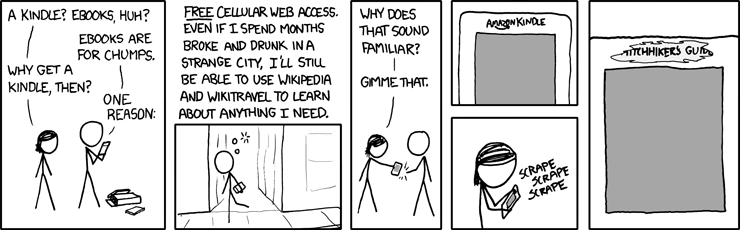
From xkcd

The web access is somewhat klunky although less so with the Kindle 2.  There are 3 modes: Basic, Advanced, and Advanced with javascript - and we can turn images off or on depending on how eager we are for data vs images.  The mobile versions of many websites make access quicker and with better formatting.

I use the 24/7 Net access when outside my home, often at stores where I can decide whether to buy something by Googling the product's model number and adding the word "review" -- this has saved me from some bad buys and also confirmed some possible buys would be good ones.

See my Tips for using the Kindle's web browser more effectively.

I was wishing, one day, that I could go check an internet machine somewhere to get information on something I wasn't sure about buying and suddenly remembered I had one in my purse :-)  At cafes, I often check something on the web.  Though I obviously love using the wireless, I am not out that often, so I don't think it's a super drain on Jeff.   (Click for a larger photo of my earlier Kindle, webbing at a cafe.)
  And here's a photo of my Kindle 2, posting to a forum and Googling a product at Target.

New Amazon fees affect some Kindlefeeder options below.
I also use kindlefeeder.com to get feeds onto to my Kindle each day (a manual click must be done now, for the free service (as automated daily sends will now cost $20/yr), and this includes up to a dozen feeds in your downloaded set (one file with table of contents for each periodical).  but good labor goes into this great service, so Daniel Choi posted that donations are welcome and his users have been responsive.  My subscription at kindlefeeder includes Engadget, Gizmodo, full-feed HuffingtonPost, NY Times Most Emailed, etc.   The set of several daily publications comes as one item each day, with a table of contents listing of and links to each downloaded periodical.  No need, in this case, to use the wireless when reading -- outside of the quick download of the daily set -- unless a feed is mainly summaries with links to the full article online.

But I also subscribe to Amazon's Kindle subscriptions that I find timely and well-written -- those include The New Yorker (w/the cartoons) at $3/mo and the NY Times Latest News, at $2/mo. -- this latter comes 2 or 3 times a day, anytime there's a big headline, which means a meaty story and there are usually about a dozen articles each download.
  While I can and did get The New Yorker feed for free, I prefer the special Amazon formatting for periodicals, allowing fast navigations to sections or to articles within sections and the usual Previous and Next article movement with the 5-way button.  I also love getting the cartoons with it.

MANUALS AND GUIDES FOR PRODUCTS BOUGHT:
I just about always lose my guides or manuals for various electronics and have now gone online to get the pdf versions, which I send to my Amazon Kindle address for auto-conversion and then they're auto-sent to my Kindle, where I can always find them (and am able to search for specific words).  This won't work well with PDFs that are primarily image-scans, as they'd load slowly and be too small for clarity and readability.  (Updated: There's a 15c charge on those conversions and deliveries direct to the Kindle for files up to 1 megabyte in size and 15c per megabyte after, rounded up -- but you can instead choose Amazon's free conversion and delivery to your regular email instead and and you can then transfer the file to the Kindle via the USB cable that comes with it.)

WEB INFO to your Kindle:
If interested in website info you've found, you can highlight the info, copy it the usual way (Windows: Ctrl-c or Mac: Cmd-c) and paste it into Winword or to a basic text file, then e-mail it to your Kindle, at which point it becomes a file of its own readable on your Kindle.  As mentioned in other entries, there are several ways to convert any web info into a PDF file as well, which then can be sent to your Kindle for Kindle-izing, but normally these should not be complex multi-columned pages although the Savory utility can work around that also.  More detailed info on the special image-type conversion here.

SEARCHING A BOOK OR ENTIRE LIBRARY on your Kindle:
The Kindle 2 now searches, as a default, only the book you happen to have open and you have the choice of it searching your entire Kindle library, which will then pretty quickly bring up all the books and periodicals with the word or phrase in question, showing summaries of each, and links to the appropriate pages.
  It also offers a search of google, if you prefer, or the Wikipedia, but you'll be asked to turn on your wireless in those cases.

  A SEARCH TIP from MobileRead forum's "Hemipod":
    "If you use the 5-way control to highlight a phrase, but don't finish the highlight, but instead press a key as if you were starting a search, the highlighted text is copied and pasted into the search box. Very, very easy way to search, say, wiki, for a phrase that's in your book."

INLINE DICTIONARY
Unlike the fatiguing and convoluted inline dictionary process for the Kindle 1, the Kindle 2 has direct cursor access to any word on a book or periodical's page, and if placed on a word, a 2-line definition of the word shows at the bottom of the screen (if the Oxford American dictionary includes the word).  If interested in the full dictionary definition plus pronunciation, you can press the Enter key on the keyboard to get that.  I used to guess the meaning of words via my understanding of the context, and it's been instructive for me :-) to actually use this feature at times.

HIGHLIGHTING, ANNOTATIONS KEPT WITH EACH BOOK (with Amazon library-backups for books bought from Amazon)
  You can easily highlight passages now, including highlighting that goes over several pages if wanted.  You can also make notes with the keyboard.  These are all searchable also, as described above for searching words or phrases.

  If the book was purchased from Amazon, then the store keeps a backed-up copy of your notes and highlighting of any book (kept in your library area at Amazon) so that if you delete the book either for space or to exclude it from your display of current titles on the Kindle, you can later re-download the book at no charge, and your highlighting and notes will be with the book. Your annotations are also kept, for viewing by book, on a password-protected private webpage when you have not disabled backup of annotations to the Amazon servers.  Here's a sample.

CLIPPINGS
The Kindle 2 now allows you to clip an entire article from a subscription newspaper or magazine with the press of a menu option.  These will go to your "My Clippings" file which is pure text.  As with any other e-reader, you can transfer the file to your computer via a USB cable and then edit it, since it collects all the clippings you've been making, which includes an extra copy of all highlighting you've done on various books so that you can use them in your text documents.  That way you can share with friends, if you have a computer, any information that's interested you enough to note it on your Kindle.  If you decide to delete the current "My Clippings" file from your Kindle the unit will create a new one for you the next time you highlight or make notes about something or when you request a clipping of an article you're reading in a periodical.  Otherwise, the Kindle just appends new notes to the file.

FONT SIZING AND LINE SPACING OPTIONS
I often find when reading normal books or magazines now that I almost instinctively start to make a movement to enlarge or decrease the font size or the spacing between lines. While almost any e-reader will give you a choice of font-sizes, the Kindle offers 6 font sizes and furthermore offers 9 settings for the amount of spacing between lines. Less spacing distance will get more lines to read on your screen while more distance may make a paragraph easier to read.  Key combo for line-spacing changes: press shift-alt together and then press a number between 1 and 9 to decrease or increase the line spacing from whatever your current choice is.  Default is '3' which is also the default for font size.

COST OF THE KINDLE PARTS
I've been amused by the reaction to recent articles about the cost of Kindle components, the general reaction equating the cost of components for the Kindle to the cost of building a Kindle and deciding that the amount over $185, from the [original] $360 price, makes it a 'cash cow' for Amazon.

 Those writers don't factor in what happens after the builders buy the components -- the manufacturing expense and the expertise to make the many features (beyond the usual e-book) work together well.  After selecting the components and readying the hardware and software conditions for the desired functions (involving a lot of paid people), then there's the mass assembling, transportation, warehousing, marketing, distribution, and management of inventory, plus (in Amazon's case) extensive customer support that's almost instantly reachable and normally more responsive than the usual (the one exception being Amazon's non-response about the lighter font issue of the Kindle 2 vs the Kindle 1).

Then there's the prepaid Sprint wireless, always 'On,' global net access which normally costs $30/mo. to have (minimum limited services) when added to basic cell phone service. That alone can cost $360, though I'm sure Amazon has a very good deal on it as long as we don't overdo the accessing (I might).  As pointed out in several entries here, netbooks given 24/7 cellular network wireless capabilities cost $60/mo. for the unlimited acccess.  Yes, it's faster access, with color, but it's aosl $720/year more on top of a netbook's unit cost

TEXT-TO-SPEECH FEATURE:
While newspapers have duly noted publisher reluctance to allow their books to be read "out loud" by the Kindle 2's automated mechanical-reader voice (they consider this as 'competition' for the professional actors reading novels with human inflections!), most publishers are allowing it. (Some Amazon users and disability rights proponents are boycotting Random House for their clueless policies against this feature)  And of course the feature can be used for reading aloud personal docs or periodicals you've downloaded if you're busy doing something else such as cooking or driving at the moment.   (I want to do a separate section on "Tom," the male voice for the Kindle because that's an intereting story.)  At any rate, this is not a feature most of us would use for any length of time!  But it's useful for the times you want to keep "reading" but must get on to other things for a bit.
  You can speed up or slow down the voice, and it turns pages for you :-).
  See a fun videoclip using the Kindle voice to read a part for a screenplay.

MP3's AND AUDIBLE BOOKS
There is a feature that allows you to play mp3s placed on your Kindle by you but they play only in the order in which they've been put on the reader.  The focus has not been on the Kindle being a music-playing machine.  This allows you to hear some of your favorite music while reading a Kindle book but it's a battery drainer. You can also put mp3s under the 'Audible' folder (since the Kindle plays Audible books also) and play those on demand but cannot read on the Kindle at the same time with this choice.  You can play mp3-audiobooks also.

NON-AMAZON BOOKS:
By the way, Kindle users are not tied to the Amazon store, although it now holds 7,400  20,000+ free books -- mainly public domain classics.  The few free books at Amazon that are not public domain ones (and usually available briefly) are found here.

  Tip:  Here's a long Amazon-forum discussion thread with tips on a million Kindle books (mostly free) for your Kindle from other sites.

OTHER UNUSUAL FORUM DISCUSSIONS
  Tip:  Amazon forum users talk about the unusually creative ways in which they use their Kindles.  Definitely an interesting read.

  Tip:  4/28/09 - Another interesting thread about how watching History Channel (or The Daily Show) and other tv shows about events have caused some to look up Kindle books on the subject that kindled interest :-)

  Tip:  4/20/09 - I was amazed at how many Huffington Post readers apparently have Kindles. In the thread for an article by Danielle Crittenden, some explain to her how much the Kindle can do despite a posting that deems the Kindle good only for reading books and not an Internet-aware device. Below are ways to Share this post if you'd like others to see it.
-- The Send to Kindle button works well only on Firefox currently.

Send to Kindle


(Older posts have older Kindle model info. For latest models, see CURRENT KINDLES page. )
If interested, you can also follow my add'l blog-related news at Facebook and Twitter
Questions & feedback are welcome in the Comment areas (tho' spam is deleted). Thanks!

DX photos updated with Mighty Bright lit ones

Added 3 shots of the Kindle DX taken at night with the first two images lit only by the Mighty Bright UltraFlex2 Clip-On Light.

The black one shown on the Amazon page as the "Kindle Version" is highly rated by well over 800 customers, and I don't know what might make it different from the silver one I have except that about 3 of the reviews mention it has padding inside the clip.  I don't know if this is true, since any padding is not advertised and is sold for use with the cover -- but I ordered one to see, because I normally use the silver one seen in my pictures, clamped onto the Kindle cover rather than the Kindle itself.  And I see that one customer says the silver one (seen on the same product page lower down) is less expensive now and is the same as the black "Kindle" one.  I'll know soon.  You can't go wrong with either one.

  Another reason I want the black one is that the silver one tends to strongly reflect back the light shining down from its lamp and distracts me a bit.  I did have an older black light and that was better re reflected light or glare but I lost that one.

  The DX is larger than the Kindle 2 by enough so that I tend not to read it with the cover the way I do with the Kindle 2.  So I've started using the light on the Kindle itself (not quite as easy to use that way).  The pictures indicate it's touching the screen but it isn't, as the clamp starts further in.  I'm aware it could scatch the bezel of the Kindle, but so far it's okay.  I don't recommend using it that way though, as it's not as secure and could scratch the bezel or even the screen. :-)


UPDATE 7/15/09 - Original posting was made 7/8/09.
I received the black "Kindle version" of the Mighty Bright on Tuesday and it does have an added foam pad that's placed inside the upper clamp, to help prevent scratching the Kindle's (or any other e-reader's) bezel.
Both versions have a pad on the inside of the lower part of the clamp.
  This is important to me because I prefer to use the DX without a cover, and at night I can use this light on the Kindle instead of on a cover.  It's less loose than my older silver one so is more secure on the Kindle -- and the neck, while still flexible, gives some resistance so that it doesn't move from its position as easily as the older version does.  When I put it on the Kindle, it just stayed in the same place and I could place the neck/lamp where I wanted without also causing movement of the base/clamp.


  This Mighty Bright Ultraflex2 lives up to its name, using 2 super-leds in the lamp, has a switch allowing you to use both (very bright) or just one of the led lights.  It uses 3 regular AAA batteries.  The neck is both flexible and stable - easy to move it into a spot where there's no bothersome glare on the Kindle while it stays in place with no problem.  It's about 3 oz. and this edition was first made available in Feb 2009 while the silver one has been out since 2007.  At the top of the black Mighty Bright page, there is a video of a customer giving a demo of the light.

  In the 3 pictures I added, the first two are taken in the kitchen with no room lights on.  Despite the bluish gray look -- in real life, the light on these in a dark room actually makes the screen look a very light gray, sometimes almost white (similar to the 3rd picture).

  The 3rd picture added is of the Jules Verne screensaver while the Kindle is on the floor, against a door.  This room was lit by a dim overhead bulb while the Kindle DX itself was lit by the Mighty Bright clipped onto it though not showing in the image.  The shade of the screen background is closer to what you see when you use the clip-on light with the unit at night.  This light is highly recommended, whichever version you get.

 The first two pictures in the updated DX set are of a PDF in normal vertical/portrait mode and then the result when the Kindle is rotated, giving a decidedly more easy to read wider-screen version,although it requires you to press the "Next Page" button to get to the lower half of a screen.
  For me it is worth pressing Next Page (though with multi-column format you would also press "Prev Page" to get to the top half again).

 I wish they'd add the native PDF support capability and manual rotation to the smaller Kindle 2, as it is available on most small competitor units being made in the last 2 months, although those new ones don't have the Kindle's study-capabilities (annotations/searches/inline-dictionary, backups) or the 24/7 wireless capability. Below are ways to Share this post if you'd like others to see it.
-- The Send to Kindle button works well only on Firefox currently.

Send to Kindle


(Older posts have older Kindle model info. For latest models, see CURRENT KINDLES page. )
If interested, you can also follow my add'l blog-related news at Facebook and Twitter
Questions & feedback are welcome in the Comment areas (tho' spam is deleted). Thanks!

Friday, June 26, 2009

Chicago Sun-Times review of DX, and my first-look

Good review by Andy Ihnatko for the Chicago Sun-Times.  Two answers to his question re the DX looking "great but who's gonna pay $489"  are along the lines of Ihnatko and yours truly.  I got my Kindle DX on the same day that review was published, Thursday.

See UPDATE 6/30 at bottom re number keys and alt/shift-combo keys.

  I'll do some photos and a small write-up after trying it out more.  It looks huge in photos (and it's not small) but it seems smaller once in your hands although of course it IS heavier than the Kindle 2, which remains my take-out Kindle when I'm out and about, in the city.

  I'll say one thing right now -- the keyboard is far better than the Kindle 2's, as I can type about twice as fast on it and the 5-way speed going up and down lines is much faster.

  I've put many PDFs on it, and it's a beautiful thing.  Will do photo comparisons of font appearance and screen contrast also, during the next week.  The material jumps out at you it's so clear.  And I've already felt (and so have friends) that the 6" Kindles were both very clear.  But this is on another level.

  However, Amazon has managed to miscalculate once more and the DX is now again not in stock for another 4 to 6 weeks. So for those interested in getting the device, it's back to pre-ordering to get a better spot in the line.

  Ihnatko's very entertaining review matches my own reactions to the DX, but still, if I could have only one Kindle it would have to be the one I can easily carry around with me outside, the 6" version.  For men, it may be different.

  I did think about buying a separate shoulder-strap flat-carrier for the DX, but the Kindle 2 will do fine for portable use.  Also a determining factor is the strength of need for accurate viewing of PDF's.  While the Sun-Times headline asks who will pay that price, he does mention the usual $30-$60/month cost of 24/7 wireless, which alone pays for the 6" device in a year, not including book-cost savings.

  And for new people reading, yes, the Kindle accepts books from almost any source around except for copyrighted books with digital-rights put on by another company.  Sony and Amazon adhere to that kind of thing, which is partly from publisher pressure.  But if you've paid for a book, you should be able to read it on any device so they'll have to work on that and it seems the trend is toward that.

I did find out that when reading a PDF, the dictionary is available to you within the PDF via the SEARCH box which comes up at the bottom when you start to type a word.  You can type in a word that puzzles and then 5-way to the right to choose the 'dictionary' option, which then starts a look-up on the word and brings up the full definition and when you press the BACK button, you're back to that spot in your PDF.  That's it for now.

UPDATE 6/30/09 - KEYBOARD: Alternative, sequential alt and shift key combos
  The Kindle DX's keyboard numerals share the top row space with alpha characters, and this choice has drawn many complaints especially because it had seemed the alt-key would have to be pressed simultaneously with the number key.

  It turns out that the number-combos work if you press them sequentially.  While this still won't be workable for math students or for anyone needing to do notes with numbers, it's considerably better than having to press the alt-key and a number key at the same time when holding the Kindle.  The sequence should be done fairly quickly though, as there is a time limit, I found.

  The sequential key sequence also holds for capitalization of letters.
The shift key doesn't have to be pressed at the same time as the alpha-character but can be pressed just before it.  (This is also true for the Kindle 1 but not for the Kindle 2.) Below are ways to Share this post if you'd like others to see it.
-- The Send to Kindle button works well only on Firefox currently.

Send to Kindle


(Older posts have older Kindle model info. For latest models, see CURRENT KINDLES page. )
If interested, you can also follow my add'l blog-related news at Facebook and Twitter
Questions & feedback are welcome in the Comment areas (tho' spam is deleted). Thanks!

Thursday, June 25, 2009

A summary of CNet's E-Reader Comparison


Atomictown, part of tricityherald.com, provides a good summary of CNet's comparison of e-book readers.  This includes (with 5-star based ratings) the Cool-er e-book reader (3-stars); the Sony PRS-700BC (3 stars); the Amazon Kindle 2 (4 stars) and the Kindle DX (3.5 stars).

More to the point, they give the main reasons along with links to the actual reviews with much more detail.

  As usual, reviews don't take into consideration, though, the very high cost of unlimited wireless access (which is not for only the Amazon store as too many have thought), but that's been covered here quite a bit already.

Also, Gizmodo has a detailed review of the Cool-er eBook Reader.  Many photos and a clean, clear looking screen but, like other reviewers, they find it awkward to use, and they recommend the Kindle 2 and Sony PRS-505 over this reader. Below are ways to Share this post if you'd like others to see it.
-- The Send to Kindle button works well only on Firefox currently.

Send to Kindle


(Older posts have older Kindle model info. For latest models, see CURRENT KINDLES page. )
If interested, you can also follow my add'l blog-related news at Facebook and Twitter
Questions & feedback are welcome in the Comment areas (tho' spam is deleted). Thanks!

Wednesday, June 17, 2009

The Kindle DX and the PDF implementation chosen

Kindlezen's Steve Bain has a very thoughtful, well-researched, and thorough report on the strange choices made in Amazon's implementation of native Adobe PDF support for the Kindle DX.

He opens with the thought that "...my overall impression is very positive" and that this is a critique of the PDF interface rather than the unit itself.  It's an understandably tough critique, considering the DX's target audience.

I'd written earlier (May 15) on the contradictory replies I received from Amazon's Kindle Support department when Kindle-2 owners discovered that the Kindle DX User's Guide implied, via menu illustrations of a PDF document in use, that there would be no highlighting or notes capability with PDFs.  It's not spelled out via text that this is so.  A technical representative explained to me that he was able to highlight pages and add a note to a page, though these could not be done for subsections of pages.  However, as explained in that earlier report, official Amazon word came on the 18th that only a converted PDF (to MOBI text format) would allow users to highlight and add notes to PDFs.

It's been noted that the small Sony PRS-700 does allow users the highlighting and note-taking capabilities for text-based PDFs although the unit has its own drawbacks.  Therefore many surmise, rightly or wrongly, that the lack of these features is more due to the type of Adobe licensing involved.

Since then, Amazon has not, as of today, offered a mechanism by which PDFs could be converted by them for the Kindle DX as is currently done automatically for PDFs sent to Kindles 1 and 2  (because it's necessary in those cases just to read them), though I had asked them to consider offering this option to avoid problems upon release because of the expressed concerns in the forums back then.

  Searches are doable in text-based PDFs but not of course in books that are created only from pages scanned as images.  More troubling, as Bain describes, is the lack of Adobe support for working-links from the Table of Contents (possibly because licensing was for a restricted feature set).  Bain describes several workarounds and the difficulties with them.

 He points out, as forum Kindle DX users also have noted, that dictionary look-ups and Text-to-Speech are also not available for PDFs.

  As a result, Bain and users on the forums are of course asking that the firmware be updated to correct most of these problems, as the DX is marketed to students for textbook and study use and to business professionals and academics who need to work with many PDFs.  That one cannot 'work with' the PDFs then but only view them is a rather serious drawback for much of Amazon's stated target market.

  Bain describes physical interface problems he and others have noted, which you can read on his site.

However, most Kindle users who want the Kindle mainly for books and periodicals and are interested only in viewing PDFs that do retain the original layout of pages, rather than in working with them, won't be particularly affected.  Exception: the lack of active links in the Table of Contents.  Amazon needs to take care of this; Adobe provides that support if it's part of the licensing purchased. [Update from original 9:00pm post added the last sentence.]

  Some photos of scientific PDFs put on the Kindle DX by Kindleboards member 'Lynn' show a unit that does have accurate multi-format layout and remarkable clarity for PDFs when original sources are not in very small print.

  While there is awkwardness in the auto-rotation to landscape mode (and some slowness under certain circumstances) in that the top portion of the page is shown and then the bottom portion is reached by using the NextPage bar -- making columnar reading that requires PrevPage bar to get to the next column -- one can see the material about 1.5 times larger that way.  (Pan and zoom aren't possible with PDFs on the DX's screen, which while large is still smaller than an 8.5 x 11 sheet of paper, nor is it possible to increase the size of the fonts.)

  Lynn finds it less trying than scrolling around on the laptop though.  She has 400 journal articles placed on her DX already, to avoid using the laptop for them.

As a result of mulling the pros and cons of this device the last week, and because I won't be working with PDFs but only viewing them and using them for various electronics manuals, educational PDFs and a lot of sheet music, I've decided to get one for myself.
  Various photos links I've collected here and the photos linked to above helped.  There are even sheet music examples there.  Page turning will be a lot easier. :-)

  But business professionals and academics interested in the PDF capabilities for their work needs should be aware of what Bain has described at Kindlezen before they make their decisions.  And Amazon should provide the usual conversions for those wanting to use the usual Kindle tools on this type of document while working on the firmware changes to make this a real tool for academics and business professionals.

Update 3:47 PM: Clarified that lack of highlighting and notes involves only PDFs. Below are ways to Share this post if you'd like others to see it.
-- The Send to Kindle button works well only on Firefox currently.

Send to Kindle


(Older posts have older Kindle model info. For latest models, see CURRENT KINDLES page. )
If interested, you can also follow my add'l blog-related news at Facebook and Twitter
Questions & feedback are welcome in the Comment areas (tho' spam is deleted). Thanks!

Monday, June 15, 2009

Kindle DX is a quick calculator too!

Blog Kindle has discovered that if you type a mathematical expression like 2+2 in the search box on the home page, you'll get an accurate result for that expression. Doesn't work for the earlier Kindles though.  Very nice for DX'rs. Below are ways to Share this post if you'd like others to see it.
-- The Send to Kindle button works well only on Firefox currently.

Send to Kindle


(Older posts have older Kindle model info. For latest models, see CURRENT KINDLES page. )
If interested, you can also follow my add'l blog-related news at Facebook and Twitter
Questions & feedback are welcome in the Comment areas (tho' spam is deleted). Thanks!

Friday, June 12, 2009

How Kindle DX differs from Kindle 2 in hands-on review. Updated


UPDATED 6/12/09 - I've added links or brief intros to a few stories on 6/11 that were of more than usual interest to me:


1.  A terrific photo-text report by Stanford student "Sri Lankan," as he calls himself.   His pictures are large original sized ones. To fit them on the screen in Firefox, press Ctrl-minus.

2.  Engadget's photos of the DX, many of them and very clear.  Review due soon.

3.  Washington Post's PaidContent blog - the newer item in this piece by Staci D. Kramer was her report that when text-to-read is enabled, the rotation doesn’t work.  

4.  Amazon DX Repair Guide" - These are step by step instructions, with photos, for disassembling the DX and one simple instruction to reverse the steps for reassembling it.
  Just what I would want to do, on a $500 item bought for reading and webbing.
  But, since they've done it for us, here's what they found inside:
Memory chips and processor
  *MCIMX31LDVKN5D, M91E, CTAK0915B
  *Samsung 916, K4X1G323PC-8GC3, EMA188A5
  *Samsung 907, KMBLG0000M-B998
  *MC13783VK5, AM86D, CTRE083B
  *Samsung 840, K4M28323PH-HG75, AAH055BE
  *Epson D135211B1, F09090125. E-INK

Their diagnosis:
  "The Kindle DX has many replaceable parts inside.  In many ways this product is user serviceable."

That IS news, in a way, as Amazon, a company that doesn't manufacture goods, doesn't repair malfunctioning units but replaces them with a refurbished unit and has no repair facilities in the U.S. for customers.  If the unit is damaged through user error in the first year, the customer returns it and pays $200 for a new $359 Kindle 2 and $180 for a new $359 Kindle 1.

5.  Gizmodo's full review by Wilson Rothman.

6.  DMP's first Manga offering on Kindle
  "Digital Manga Publishing (DMP) has announced on Wednesday that it is offering the first volume of Hideyuki Kikuchi and Saiko Takaki's Vampire Hunter D manga on Amazon's Kindle Store for electronic books. Kindle Books can be read on Amazon's own Kindle devices (in three different versions) and Apple's iPhone and iPod touch mobile devices...  currently, most of the offerings in the Kindle Store's manga category are works wholly or partially created outside Japan."

7.  Kindle DX PDF FAQ by abhi/switch11.  Top 10 Things to Know, The Good and the Bad, the Features and the Missing. Excellent presentation.

Click to SKIP TO MORE RECENT STORIES.
__________
UPDATED 6/11/09 - There are many stories about the Kindle DX now, but not much that's new or substantial (two writers for large news entities open their DX boxes, say not much we don't already know and then try out the Kindle in bed to end their columns).

One exception is Businessweek's Stephen H. Wildstrom whose headline is that the "Kindle DX Means Business."  He at least explores the effectiveness of the PDF display.  (I've corrected his link to the math textbook, which led to an empty page that had held an older version.)   The textbook he chooses is an impressive test of the DX's capabilities.
' I experimented with a variety of PDF documents and was very pleased with the results.  In the toughest test, I loaded a PDF version of a mathematics textbook, and everything, including formulas, drawings, footnotes, and margin notes, rendered beautifully.  The only real drawback is that links, such as listings in a table of contents in a PDF, won't work in the Kindle—a limitation of the underlying Adobe software.  But you can work around this by using search to jump to the section you want.
. . .
Amazon doesn't have the large-format reader field to itself.  A company called iRex sells a 10.2-in. reader for a stiff $859 [with no wireless].  And startup Plastic Logic plans to bring a very lightweight 14-in. reader to the market early next year. '
The PDF's non-working links, normally used for jump areas like the table of contents, are a puzzlement.  It's probably not the software but the limitations of the feature-set that Amazon licensed, since we are usually able to make active links in PDFs -- or the original PDF just didn't have that feature activated.

NOTE:  Amazon's Kindle DX page tells us on the evening of June 10th that DX's will be "in stock June 17."]

FURTHER UPDATE, 6/11/09 - 5:26 AM
Wall Street Journal's Personal Technology writer, Walter S. Mossberg, has some interesting pro's and con's on his DX.  He prefers the Kindle 2 for its lightness, as he tends to read only books on it, not liking the magazine layout that he finds harder to browse articles with.  I left him a post on that, as I did for a NY Times reviewer who had not discovered the article-browsing feature within Sections.  Maybe Mossberg already knew this though.

Points he makes:
1.  Size & weight made it more awkward for him to hold for extended reading
2.  Controls are confusing when reading in landscape mode
3.  He points out that Excel and Powerpoint can be converted to PDF and thus readable on the Kindle DX.
4.  Reading standard books, he sometimes saw text that varied in shade from light gray to black.  (This can be due to the original being in color.)
5.  "I tried a variety of documents, and in many cases the results were great"
6.  There is no zoom when the PDF text is too small to read.
7.  Reading in landscape mode makes the text larger though but splits the page.
8.  "...you can adjust the margins on the DX, to obtain a line length that's comfortable for your eyes and optimal for reading speed."
9.  College textbooks could be the 'killer app' for the DX

UPDATED 6/10/09 - Original posting: 6/3/09, 3:25 PM
WIRED's Steven Levy has the first review up on shipping day, though it doesn't differ much from early reviews that were based on a short time with the Kindle DX.  The pictures are familiar but -- head on -- the difference between the screen sizes of the Kindle DX and the Kindle 2 is striking.  A couple of the images are more in sepia tone than black and white, which is sort of interesting.  They say it's comfortable to hold (despite being 8 oz. heavier).  I'm waiting for someone to review the differences in web browsing between the DX and K2 though.

Earlier (June 3)
Now that the Kindle DX has started shipping and it's a reality sooner than some had expected, many are wondering what it is really like, and some are interested in the size relative to the Kindle 2 and the clarity of the screen.

Here are some more hands-on articles and galleries that may help.

Laptop Mobile Solutions' Gallery: Hands-On with the Amazon Kindle DX has some very clear pictures from several angles.   The article by Joanna Stern is pretty brief.

Slashgear has a good video and excellent large photos - some of the more useful images I've seen.  To get to the next or previous larger photo easily, use your mouse to 'hover' over the middle of the left or right edges.

  They also have a small page for the Kindle DX specs in a nutshell, more or less, along with more slick official Amazon photos.

  The article, by Vincent Nguyen, makes some good points.  Examples:
" ...it feels a very different device to the Kindle 2.  Where that e-reader prioritizes the hand-feel and portability of a paperback, the Kindle DX feels decidedly more work-oriented.  The bigger screen - which refreshes a little slower than that of the Kindle 2, but not frustratingly so - is 1,200 x 824 resolution and 150ppi, and while still grayscale feels far more useful than that of its smaller sibling...

... noticeably heavier, and might make bedtime reading less comfortable.

... While it’s now particularly small, we’re pleased with how the keyboard has been reduced: it’s still usable for entering search terms and the like, but the front panel of the Kindle now feels as screen-focused as it should be...

  Unlike on a cellphone like the iPhone, where the rotation is completed in seconds, the E Ink display on the Kindle DX is a lot slower:  perhaps 3-4 seconds before it flips.  Still, we’d happily sacrifice some speed for landscape reading;  this really is a huge stretch of E Ink panel, and it’s in this orientation when you really recognize that the display is 2.5 times that of the Kindle 2."
The article doesn't mention trying out PDFs with the Kindle DX, now that a Kindle model has native PDF support.
Below are ways to Share this post if you'd like others to see it.
-- The Send to Kindle button works well only on Firefox currently.

Send to Kindle


(Older posts have older Kindle model info. For latest models, see CURRENT KINDLES page. )
If interested, you can also follow my add'l blog-related news at Facebook and Twitter
Questions & feedback are welcome in the Comment areas (tho' spam is deleted). Thanks!

[Valid RSS]