Showing posts with label goodreads. Show all posts

Tuesday, December 27, 2016

Today only -- Over 40 Goodreads Choice Award winners and finalists at up to 80% off on Kindle. Dec 27 only. Updated with corrected link + books I chose.


Just a quick flash since there is a one-day deal on some 'choice' Kindle books that may be of more interest than the usual.

I haven't been active on the blog, but when I saw this, I thought this was a good change from the usual.

At the last-minute-deals page for today only, December 27, 2016, Amazon is offering over 40 Goodreads Choice Award winners and finalists at up to 80% off on Kindle.
  [URL corrected]
When on that last-minute deals page, click on the image you see here (today only though), to browse what's available.


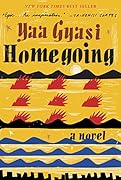
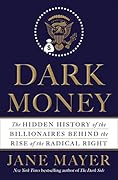
I took the opportunity to get two books I wanted to read but not at normal pricing:

Dark Money: The Hidden History of the Billionaires Behind the Rise of the Radical Right

By Jane Mayer
Sold by: Random House Digital, Inc.

Homegoing: A novel

By Yaa Gyasi
Sold by: Random House Digital, Inc.


I don't buy books as often as I used to, being so behind in reading, but this was definitely one of the better one-day Kindle deals.


Check often: Temporarily-free recently published Kindle books
  Guide to finding Free Kindle books and Sources.  Top 100 free bestsellers.  Liked-books under $1
UK-Only: recently published free books, bestsellers, or £5 Max ones
    Also, UK customers should see the UK store's Top 100 free bestsellers.

  *Click* to Return to the HOME PAGE.  Or click on the web browser's BACK button.


Below are ways to Share this post if you'd like others to see it.
-- The Send to Kindle button works well only on Firefox currently.

Send to Kindle


(Older posts have older Kindle model info. For latest models, see CURRENT KINDLES page. )
If interested, you can also follow my add'l blog-related news at Facebook and Twitter
Questions & feedback are welcome in the Comment areas (tho' spam is deleted). Thanks!

Tuesday, June 30, 2015

Kindle Tips: Software Update v5.6.1.1 for original Paperwhite 1 (US, UK) ... Info and tips on how to use the features


Amazon has announced software update version 5.6.1.1 for the original Paperwhite-1

The announcement, posted in the Kindle Forums, was for a "free software update available for the original Kindle Paperwhite.  This update adds features including Word Wise and Family Library that were previously only available on newer generation Kindle e-readers."

The software update includes "general improvements and the following feature enhancements"

Added text in brackets and emphases in boldface or italics are mine:

~Word Wise -For readers learning English and kids learning to read, Word Wise, available on many English language titles, makes it easier to enjoy and quickly understand more challenging books.  Short and simple definitions automatically appear above difficult words, so you can keep reading with fewer interruptions.
[Tip: Here's a page on HOW to use Wordwise, including how to turn it off or on.  The page explains that not all books are wordwise-enabled.  Here's a link to Amazon's listing of currently Wordwise-enabled books.]
  To learn more or to see the various meanings the same word can have in different contexts, just tap on the word to bring up a simple card with definitions, synonyms, and more.
  You can adjust the number of hints you see with a simple slider, dialing them up or down as you learn and grow.  See a screenshot.

~Family Library- With Kindle and Kindle reading apps, you can access not only your own books, but also books from the Amazon account of a spouse or partner.  See a screenshot
[Tip: Prime members that use a business name can share free 2-day Prime-shipping among 4 employees sharing the space.]
~Kindle FreeTime Unlimited - An all-in-one subscription for kids that offers unlimited, ad-free access to more than 5,000 age-appropriate books, videos, educational apps and games, for as little as $2.99 per month.
  [Tip: Freetime Info Links for specific Kindle devices:
  Paperwhite 1; later Kindle eReaders; and Fire tablets
]
~Expanded X-Ray for Books - X-Ray now makes it easier to explore as you read-quickly flip through all the images in a book, and use the new timeline view to easily browse the most notable passages.  See a screenshot.

~Deeper Goodreads Integration - Goodreads on Kindle makes it quicker to access and update your reading status and adds the ability to preview and purchase books without leaving Goodreads.  See a screenshot.

~Enhanced Search - Makes it even easier to find what you're looking for by combining and previewing results from your Library, Goodreads and the Kindle Store on the same page.  See a screenshot

~About This Book- See information about the book as you start to read, including its place in a series and author information, plus mark it as "Currently Reading" on Goodreads.  See a screenshot

These features will be delivered automatically as part of a free, over-the-air software update in the coming weeks, or you can visit [the Paperwhite1 software page] to download the software update [U.S.]...'  [the UK Paperwhite 1 owners page here]

I corrected some links in the original announcement on the forums.

It's good to see Amazon continuing to support the original Kindle Paperwhite (2012).


Check often: Temporarily-free recently published Kindle books
  Guide to finding Free Kindle books and Sources.  Top 100 free bestsellers.  Liked-books under $1
UK-Only: recently published free books, bestsellers, or £5 Max ones
    Also, UK customers should see the UK store's Top 100 free bestsellers.

  *Click* to Return to the HOME PAGE.  Or click on the web browser's BACK button


Below are ways to Share this post if you'd like others to see it.
-- The Send to Kindle button works well only on Firefox currently.

Send to Kindle


(Older posts have older Kindle model info. For latest models, see CURRENT KINDLES page. )
If interested, you can also follow my add'l blog-related news at Facebook and Twitter
Questions & feedback are welcome in the Comment areas (tho' spam is deleted). Thanks!
Friday, March 29, 2013

Kindle News: Goodreads acquisition, background + interviews. Cloud Reader for Web.


AMAZON'S ACQUISITION OF GOODREADS

When the news hit, The Kindle Chronicles podcast and blog by Len Edgerly posted an interesting story on it right away giving some of the background of Goodreads.


Otis Chandler's announcement for Goodreads and comments from their user base
Goodreads' own announcement and comments from their audience is of course a key read.

  Another essential read is ' "First do no harm:" My interview with Amazon and Goodreads on the future of Goodreads ' by Laura Hazard Owen for paidContent.

One essential point made in the interviews:
' ...[Amazon's] Grandinetti says Goodreads will be an independent subsidiary of Amazon, like Zappos or IMDB. The site will remain based in San Francisco. Chandler remains CEO, reporting to Grandinetti.  Chandler said that Goodreads’ entire team is staying on (and that the company is hiring). To the question of a redesign, he said there is “nothing specific to mention in relation to the acquisition.”'

With regard to a merging of Amazon reader reviews and Goodreads' reviews, Russ Grandinetti [RG] says he thinks there aren't any "specific plans to do that at this time" and that "Our mentality here is to first do no harm, and make sure that if we’re going to do integrations, users genuinely find it to be a big benefit.”

I've liked that I'm never particularly aware that Amazon has done anything to stifle IMDB, Zappos, or DPreview (cameras) insofar as feeling that editorial control or operating styles have been affected in any bad way with these sites that I've enjoyed for some time.

While Chandler [OC] felt that links to other retailers like Barnes & Noble and Indiebound might be retained "if users really want those links," I think that's highly unlikely!, even for books Amazon doesn't have, as they would probably not want a wholly-owned subsidiary to drive traffic to the another store like B&N, which sells the same mainstream books.

A benefit for Goodreads customers, OC said, was the ability to bring a book "into Goodreads and enabling people to just start reading right there from the Kindle Cloud Reader.  We’ve never had a good book preview feature.”

RG said that the international aspect for both Goodreaders and Amazon are "an area of opportunity for both of us to work on."

OC mentioned that, re the public API or applications interface, that "we're not going to shut [the Kobo feed] off."

There's a lot more from the interviews of course, at paidContent's site, so go there to read the rest of it and the comments.

If after reading at the sites linked above, you want to read more reactions to this merging, see this set of news results.


Earlier articles explaining Cloud Reader
. Kindle Cloud Reader arrives
. Reactions to Kindle Cloud Reader


Current Kindle Models for reference, plus free-ebook search links.

  NOTES on newer Kindles.
US:
Updated Kindle Fire 2 Basic  7" tablet - $159
Kindle Fire HD 7" 16/32GB - $199/$249
Kindle Fire HD 8.9" 16/32GB - $269/$299
Kindle Fire HD 8.9" 4G 32/64GB - $399/$499
Kindle NoTouch ("Kindle") - $69/$89
Kindle Paperwhite, WiFi - $119/$139
Kindle Paperwhite, WiFi+3G - $179/$199
Kindle Keybd 3G - $139/$159, Free slow web
Kindle DX - $379 $299 Discontinued
UK:
Kindle Basic, NoTouch - £69
Kindle Touch WiFi, UK - ~£89 Refurb'd
Kindle Keyboard 3G, UK - £149
  Keybd: w/ Free, slow 3G WEB
Kindle Paperwhite, WiFi
£109
Kindle Paperwhite 3G, UK
£169
Kindle Fire 2, UK
 £129
Kindle Fire HD 7" 16/32GB, UK
£159/199
Canada - Kindlestore, CDN-$
Kindle Basic, NoTouch - $89
Kindle Paperwhite, WiFi - $139
Kindle Paperwhite, WiFi+3G - $199
*OTHER International*
Kindle NoTouch Basic - $89
Kindle Touch WiFi - $139
Kindle Keybd 3G - $189
  Keybd: w/ Free, slow 3G WEB
Paperwhite WiFi $139, 3G/Wifi $199

France Boutique Kindle
Deutschland - Kindle Store
Italia - Kindle Store
Spain - Tienda Kindle
Brazil - Amazon Brazil
China - Amazon China
Japan - Amazon Japan

Below are ways to Share this post if you'd like others to see it.
-- The Send to Kindle button works well only on Firefox currently.

Send to Kindle


(Older posts have older Kindle model info. For latest models, see CURRENT KINDLES page. )
If interested, you can also follow my add'l blog-related news at Facebook and Twitter
Questions & feedback are welcome in the Comment areas (tho' spam is deleted). Thanks!

[Valid RSS]