Showing posts with label mp3's. Show all posts

Tuesday, March 27, 2012

Kindle Touch 3G now available in 175+ countries. Kindle features vs Nook features - Update


Amazon is really in motion these days, isn't it.

  Now they've announced that the Kindle Touch 3G will be available in over 175 countries.  All this time, the UK had only the Kindle Basic (NoTouch/NoKeyboard) available for purchase there.

The heading on their Press Release:
' Kindle Touch 3G – the most full-featured Kindle e-reader – easy-to-use touch screen and free 3G wireless, no annual contracts or monthly fees and never pay for or hunt for a Wi-Fi hotspot

Now available in multiple languages – German, French, Italian, Spanish, Brazilian Portuguese and American and British English '

It's available today for pre-order from Amazon.

The Kindle Touch 3G will ship to customers beginning April 27, a month from now. Kindle Touch and Kindle Touch 3G are also available today for pre-order from Amazon.co.uk, Amazon.de, Amazon.fr, Amazon.es and Amazon.it.  (Until recently, Kindles in Italy were ordered from U.S. Amazon.)

Update- A personal review or report cited today
KindleZen tweeted the link to this article, "The Right Tool for the Job: The Kindle Touch," this morning, giving his reasons for the title. [End of update]

X-ray Feature
I personally love using the X-Ray feature (now being made available on Kindle Fire also) on non-fiction books especially, but it's also useful to keep track of characters in novels as well.

  You can learn more about what X-Ray actually is or does, at What does X-Ray do? and with an example of my use of it in the book on Steve Jobs in the Tips post on Kindle Touch and its X-Ray Feature.

Kindle Touch features, beyond reading
The Kindle Touch (both in WiFi and in 3G/WiFi) comes with built-in speakers supporting text-to-speech when the publisher allows it, audiobooks, and mp3 files.

Now, I've been asked a lot about whether to get a Kindle or a Nook Touch.  I had bought a Nook Color on sight at my B&N (and used it daily for a year) but am not keen on the Nook Simple Touch because its many font faces and size choices displayed much lighter than what I'm used to seeing with the Kindle 3 Keyboard and Touch models.  B&N wouldn't allow me to photograph them side by side so I could have something more to go on than my personal reaction.  But the relative lightness was described in some magazine reviews and they've recently improved the darkness level, I read.  The darkness of fonts is important to me, and I was among those who posted about the lightness of Kindle 2 fonts (and was quoted in Wired on the problem for some Kindle users).

Nook and its "no ads" statement
It's said the Nook doesn't have ads, but almost half the Nook's Home screen is comprised of recommendations from B&N as to what you might like to read.  I'm one that doesn't want books I haven't chosen to buy, appearing on my home screen like that and, to me, they are ads, and others have felt that way.

Nook Touch advantages over Kindle Touch
 However, in response to those who ask, there are things many have preferred on the Nook (though The Nook Touch is NOT available globally nor can most people outside the U.S. buy Nook books -- which is not a small point especially when U.S. Nook owners can't buy Nook books for their devices while traveling outside the U.S.
  [ B&N was trying to change this.  Let me know if they did.]
  Update
  Commenter Geert responded that B&N changed this last year to allow US credit card holders to be able to buy from outside the U.S.  He added a note about SD card storage, so read the comments also to get that added information.

  .  The Nook has a wider bezel.  That may make it look squarer but it gives the hands more support in that you don't inadvertently touch the screen and turn a page that way.
  .  You can hold the Nook Touch and turn pages with one hand more easily, because it has page-turn buttons, while Amazon did away with the buttons.
  .  You can flip ahead more easily on the Nook, with a slider that lets you move ahead a certain amount.
  .  The Nook Touch, like the Kindle Touch, has "Real" page numbers matching a given print book version for thousands of books, but they also have page numbers that they create when there is nothing available with page numbers that would match a print book.  Many are comforted by having page numbers at all, as they're a more traditional reference than a 4-digit 'location' number (even if the latter is accurate in absolute terms no matter what the font size may be).

Why would anyone buy a Kindle Touch over the Nook Touch?
A couple of months ago, an Amazon Kindle forum member asked about this point:
  If the Kindle Touch 3G does not offer 3G access usable on any webpages beyond Free 24/7 Wikipedia access and the Amazon store, why should anyone not just buy a Nook then.
 (Never mind that no other e-reader offers free 3G access 24/7 to Wikipedia.)

  I didn't blog my response for months because I know that I'm biased on this.  But that's based on some quite real aspects of the two e-readers.
  So, here's a copy of what I posted at the time, in a format that replies to what the Kindle does have and can do that the Nook Touch can't.  Again, there's no pretense to being neutral, as the reasons given are the basis for the bias in my case.
' Zad,
Re your note that the new KTouch is [basically] the nook Touch and your question
  "What sets your reader apart now Amazon?"

I'm not Amazon but I've identified the following for a blog entry earlier:

1a. The Kindle has a web browser that works very well under WiFi.
1b. The Nook doesn't have a web-browser at all and B&N removed recently the vestiges of the hidden one that didn't really work, which is why B&N's comparison chart said the Nook didn't have a web browser.

2a. The Kindle has audio and music
2b. The Nook Touch doesn't.

3a. The Kindle has text to speech on most books and all personal docs
3b. The Nook doesn't.

4a. Kindle owners get 5 free gigs of storage space for personal documents (non-Amazon documents) [And these are now sync'd across various devices.]
4b. Nook owners don't. Nor do they have the free 5 gigs ALL Amazon customers get for storage of whatever legitimate [non-Amazon] documents and files they have.

5a. The Kindle can zoom any photo [or map] to full screen, within a book.
5b. The Nook Touch can't. (I can't do it on my NookColor books either.)

6a. Kindle owners who pay $6.58/mo. for unlimited free 2-day shipping of goods sold by Amazon itself get a bonus of access to instant video streaming of about 12,000 movies and tv shows -- older, but good ones, and some new ones from PBS and BBC -- for either their computers, their Kindle Fires if they have one, or even the TV, via a Roku or siimilar box.
6b. B&N offers no free streaming of media

7a. Kindle owners who pay that Prime membership also get now the bonus of being able to borrow one popular book per calendar month with no waiting period or due date.
7b. B&N doesn't have a program like that.

8a. Owners of the Kindle ereader can buy Kindle books when vacationing out of the country.
8b. Owners of the Nook ereader can't buy Nook books when out of the U.S.
    [Update: This was changed to allow this for U.S. customers using US credit cards.]


9a. 3G Kindle owners get free 3G web access to all of Wikipedia at any time, to look up information.
9b. The Nook Touch B&W has no web browser.

10a. Kindle owners get a personal web server page that shows their annotations for each book, backed up and displayable and transferrable to their computers.
10b. B&N hasn't made anything like that for the Nook.

- Andrys
http://kindleworld.blogspot.com '

Note that I didn't mention the X-Ray feature, which many find quite useful.

Nevertheless, look at the Nook Touch advantages above before making up your mind if you're trying to decide between the two (as many still are).


Kindle Touch 3G, US-only   Kindle Touch WiFi (US)   Kindle Touch WiFi-Only, outside US    Kindle Basic   (UK: KBasic)   Kindle Fire
Kindle Keybd 3G   (UK: Kindle Keybd 3G)   K3 Special Offers   K3-3G Special Offers   DX

Check often: Temporarily-free recently published ones
  Guide to finding Free Kindle books and Sources.  Top 100 free bestsellers.  Liked-books under $1
UK-Only: recently published free books, bestsellers, or £5 Max ones
    Also, UK customers should see the UK store's Top 100 free bestsellers.

  *Click* to Return to the HOME PAGE.  Or click on the web browser's BACK button Below are ways to Share this post if you'd like others to see it.
-- The Send to Kindle button works well only on Firefox currently.

Send to Kindle


(Older posts have older Kindle model info. For latest models, see CURRENT KINDLES page. )
If interested, you can also follow my add'l blog-related news at Facebook and Twitter
Questions & feedback are welcome in the Comment areas (tho' spam is deleted). Thanks!

Sunday, January 24, 2010

Another 1.5 million Free Books-Documents + Other good items

Internet Archive Text area - almost 2 million free books and documents - Kindle formats included, via ".mobi" or ".prc" files or specifically labeled "Kindle."
  Remember that the Kindle also directly reads .txt and PDF files although .prc or .mobi ones may be more readable in font size.

  There are also areas of files with somewhat questionable value, but the main sub-collections include American Libraries, Canadian Libraries, Universal Libraries (Carnegie Mellon, governments of India, China, Egypt), Project Gutenberg (another access point) -- and there are recent contributions from The Library of Congress, UCLA Scanning Center's special collections, etc.).  Thanks to Courtney who reminded me of this in a Comments area here.  I'll add this to the ongoing free and low-cost books posting next time.  Note that there is also free live music and audio linked on the home page.

The Get a Human page
This is one of my all-time favorite resources, the Get a human on the phone page.  It includes almost 1,600 companies, with each link expandable to show several phone numbers found (for each company) which can eventually get you a human, and with instructions on how to do that.  This is a webpage rather than a book, and there's no charge for the information there.

When you're away from a computer, a Kindle book with similar focus could be useful (although you can use the Kindle web browser to reach the Get a Human page even if you're away from a computer).
  Here's a Kindle book of phone numbers gathered by Mobile Reference, titled Secret Toll-Free Customer Service Phone Numbers and Shortcuts to an Operator for Nearly 600 Businesses and US Government Agencies
  2 customer reviews, 5 stars - $3.99

Also useful, maybe, Country Calling Codes, Dialing Instructions, and Worldwide Emergency Phone Numbers.
  1 customer review, 5 stars   (not a useful review but an example from the book helps) - $0.99

UNUSUAL ITEM - Microsoft WordTalk - Free
Microsoft WordTalk has been developed for use with, you guessed it, Microsoft Word, versions '97 and above. Its functions are:

"It will speak the text of the document and will highlight it as it goes...
  It contains a talking dictionary to help decide which word spelling is most appropriate." You can:
  . adjust the highlight colors
  . change the voice and the speed of the speech
  . convert text to speech and save as a .wav or .mp3 file so that it can be played back on an iPod or mp3 player."
UPDATE 1/25/10
  I'll add that an mp3 can be played back on the Kindle by placing the file in the "music" folder of the Kindle.  These are played in the order they were placed on the Kindle though.  And mp3s take much more space than books.

  If interested, download Wordtalk at www.wordtalk.org.uk.   It's a free plug-in.  If you don't have .Net Framework 3.5 SP1 you'll need to download .Net Framework first, which you can get here.

Almost free - A Kindle shortcuts book
FIRST, be sure to check out Kindle books I've read and enjoyed, shown on the right-hand side of the webpage.

Am adding here another Kindle book (I haven't read it and can't rate it):
  Kindle Shortcuts + guides and hidden features, by Aaron Steinhardt.  Publisher: MobileReference
  31 customer reviews, 3.5 stars out of 5, $0.25


Free and low-cost books, Jan. 14, 2010 - Update3: Still current
  Miscellaneous items


MP3's from the Hope for Haiti Now Telethon, with proceeds to groups working in Haiti
  Amazon is offering an album of mp3s of songs from the telethon Friday night.  Here's the Los Angeles Times report of the event.
  From the report and some video clips I've seen, buying the album (mp3's) or some individual tracks from that night will benefit any of us as well as help the relief work in Haiti.   Amazon explains:
' All proceeds from album sales of Hope for Haiti Now will go to the Clinton Bush Haiti Fund, Oxfam America, Partners in Health, Red Cross, UNICEF, United Nations World Food Programme, and Yele Haiti Foundation. In addition, all proceeds from the special studio version of "Stranded (Haiti Mon Amour)" by Jay-Z, Bono, the Edge, and Rihanna will go to Partners in Health. '


LINKS FOR SEARCHING FOR FREE OR LOW-COST E-BOOKS
  As ever, here is the ongoing set of links for various Searches for free or low-cost Kindle-compatible books. Below are ways to Share this post if you'd like others to see it.
-- The Send to Kindle button works well only on Firefox currently.

Send to Kindle


(Older posts have older Kindle model info. For latest models, see CURRENT KINDLES page. )
If interested, you can also follow my add'l blog-related news at Facebook and Twitter
Questions & feedback are welcome in the Comment areas (tho' spam is deleted). Thanks!

Wednesday, July 8, 2009

Is the Kindle only an E-Reader? Why $360259? Why $489379 for the DX?

[Updated for pricing change on July 8, 2009 - 11:48 PM] - Original posting was March 19, 2009 and this has been updated a few times.
New belated update for decreased prices, on November 12

It's a good time to take another look at what the Kindle 2 does for the price.

Many blog reviews and commenters have said that the Kindle is too pricey for "just an E-Reader."  But is that all it is?  Jeff Bezos has mentioned the high expense of the advanced 'radio modem' as well as the newest E-Ink screen, with its 16 shades of gray and a faster processor.

The 24/7 "always On" wireless access to the global net with no time charges for Kindle users would be one reason it's $360 $299 [price reduced July 8, 2009] $259 [price reduced October 6, 2009].

[Prices changed later but am not modifying the part below, written May 2009]
  UPDATED: May 2009 to cover the coming 9.7" screen Kindle DX which has a screen surface area 2.5" times the size of the Kindle 2, priced at $130 more ($489) and with native Adobe support for PDFs.  The other information below remains true for the larger DX.  Amazon is taking pre-orders now, for earlier shipping dates.  Note that the closest big-screen e-reader (Irex Iliad) is $860~ with wireless of some type.

UPDATED: 4/25/09 from original posting of March 19: I've been asked about any additional factors that might justify the cost of the Kindle.  Originally posted March 19, 2009 at 8:07 am upon starting 'A Kindle World' blog, this article now also includes notes on non-Internet-access (non-wireless) features that are missing on other e-readers or which aren't as well implemented on them.  The additional information is integrated with what was written earlier.

Sony's advanced model, PRS-700, has 8 shades but also a touch screen and side-lighting.  Unfortunately, the two hot features on this Sony have caused reviews (see NYT's David Pogue's) citing a loss of clarity as well as even lighting and glare.  While the Sony doesn't have the Kindle's cell-phone style wireless Net access, much less 24/7 access at no monthly (or hourly) cost, the Sony costs more.  It does handle more formats in native format (ePubs and PDFs -- although reviews can be scathing about the readability of its small PDF fonts at highest font setting vs the Kindle's conversion results, but Calibre allows us to convert pdfs, ePub and Lit files to Kindle format now, while MobiPocket Creator converts PDF (and other files) into Kindle format and PDFReader may do a better job with image-based ones.  Stanza is the one to use for those with Macs.  Savory is an experimental utility that converts PDFs ON your Kindle, offering both text- and image-based conversions.
UPDATE - 4/27/09: Amazon bought Stanza today.

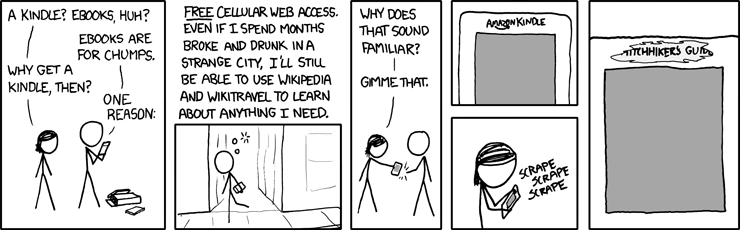
Unlike searches for wi-fi hot spots (often with fees), Amazon's partnership with Sprint for use of its EV-DO cellphone network means that the Net is accessible almost anywhere a cell phone can be used, and with the Kindle there are no monthly data-charges as there must be for phones -- usually at least $30/mo for a limited plan, which at 12 months = $360.  An interesting figure, I thought!


From xkcd

The web access is somewhat klunky although less so with the Kindle 2.  There are 3 modes: Basic, Advanced, and Advanced with javascript - and we can turn images off or on depending on how eager we are for data vs images.  The mobile versions of many websites make access quicker and with better formatting.

I use the 24/7 Net access when outside my home, often at stores where I can decide whether to buy something by Googling the product's model number and adding the word "review" -- this has saved me from some bad buys and also confirmed some possible buys would be good ones.

See my Tips for using the Kindle's web browser more effectively.

I was wishing, one day, that I could go check an internet machine somewhere to get information on something I wasn't sure about buying and suddenly remembered I had one in my purse :-)  At cafes, I often check something on the web.  Though I obviously love using the wireless, I am not out that often, so I don't think it's a super drain on Jeff.   (Click for a larger photo of my earlier Kindle, webbing at a cafe.)
  And here's a photo of my Kindle 2, posting to a forum and Googling a product at Target.

New Amazon fees affect some Kindlefeeder options below.
I also use kindlefeeder.com to get feeds onto to my Kindle each day (a manual click must be done now, for the free service (as automated daily sends will now cost $20/yr), and this includes up to a dozen feeds in your downloaded set (one file with table of contents for each periodical).  but good labor goes into this great service, so Daniel Choi posted that donations are welcome and his users have been responsive.  My subscription at kindlefeeder includes Engadget, Gizmodo, full-feed HuffingtonPost, NY Times Most Emailed, etc.   The set of several daily publications comes as one item each day, with a table of contents listing of and links to each downloaded periodical.  No need, in this case, to use the wireless when reading -- outside of the quick download of the daily set -- unless a feed is mainly summaries with links to the full article online.

But I also subscribe to Amazon's Kindle subscriptions that I find timely and well-written -- those include The New Yorker (w/the cartoons) at $3/mo and the NY Times Latest News, at $2/mo. -- this latter comes 2 or 3 times a day, anytime there's a big headline, which means a meaty story and there are usually about a dozen articles each download.
  While I can and did get The New Yorker feed for free, I prefer the special Amazon formatting for periodicals, allowing fast navigations to sections or to articles within sections and the usual Previous and Next article movement with the 5-way button.  I also love getting the cartoons with it.

MANUALS AND GUIDES FOR PRODUCTS BOUGHT:
I just about always lose my guides or manuals for various electronics and have now gone online to get the pdf versions, which I send to my Amazon Kindle address for auto-conversion and then they're auto-sent to my Kindle, where I can always find them (and am able to search for specific words).  This won't work well with PDFs that are primarily image-scans, as they'd load slowly and be too small for clarity and readability.  (Updated: There's a 15c charge on those conversions and deliveries direct to the Kindle for files up to 1 megabyte in size and 15c per megabyte after, rounded up -- but you can instead choose Amazon's free conversion and delivery to your regular email instead and and you can then transfer the file to the Kindle via the USB cable that comes with it.)

WEB INFO to your Kindle:
If interested in website info you've found, you can highlight the info, copy it the usual way (Windows: Ctrl-c or Mac: Cmd-c) and paste it into Winword or to a basic text file, then e-mail it to your Kindle, at which point it becomes a file of its own readable on your Kindle.  As mentioned in other entries, there are several ways to convert any web info into a PDF file as well, which then can be sent to your Kindle for Kindle-izing, but normally these should not be complex multi-columned pages although the Savory utility can work around that also.  More detailed info on the special image-type conversion here.

SEARCHING A BOOK OR ENTIRE LIBRARY on your Kindle:
The Kindle 2 now searches, as a default, only the book you happen to have open and you have the choice of it searching your entire Kindle library, which will then pretty quickly bring up all the books and periodicals with the word or phrase in question, showing summaries of each, and links to the appropriate pages.
  It also offers a search of google, if you prefer, or the Wikipedia, but you'll be asked to turn on your wireless in those cases.

  A SEARCH TIP from MobileRead forum's "Hemipod":
    "If you use the 5-way control to highlight a phrase, but don't finish the highlight, but instead press a key as if you were starting a search, the highlighted text is copied and pasted into the search box. Very, very easy way to search, say, wiki, for a phrase that's in your book."

INLINE DICTIONARY
Unlike the fatiguing and convoluted inline dictionary process for the Kindle 1, the Kindle 2 has direct cursor access to any word on a book or periodical's page, and if placed on a word, a 2-line definition of the word shows at the bottom of the screen (if the Oxford American dictionary includes the word).  If interested in the full dictionary definition plus pronunciation, you can press the Enter key on the keyboard to get that.  I used to guess the meaning of words via my understanding of the context, and it's been instructive for me :-) to actually use this feature at times.

HIGHLIGHTING, ANNOTATIONS KEPT WITH EACH BOOK (with Amazon library-backups for books bought from Amazon)
  You can easily highlight passages now, including highlighting that goes over several pages if wanted.  You can also make notes with the keyboard.  These are all searchable also, as described above for searching words or phrases.

  If the book was purchased from Amazon, then the store keeps a backed-up copy of your notes and highlighting of any book (kept in your library area at Amazon) so that if you delete the book either for space or to exclude it from your display of current titles on the Kindle, you can later re-download the book at no charge, and your highlighting and notes will be with the book. Your annotations are also kept, for viewing by book, on a password-protected private webpage when you have not disabled backup of annotations to the Amazon servers.  Here's a sample.

CLIPPINGS
The Kindle 2 now allows you to clip an entire article from a subscription newspaper or magazine with the press of a menu option.  These will go to your "My Clippings" file which is pure text.  As with any other e-reader, you can transfer the file to your computer via a USB cable and then edit it, since it collects all the clippings you've been making, which includes an extra copy of all highlighting you've done on various books so that you can use them in your text documents.  That way you can share with friends, if you have a computer, any information that's interested you enough to note it on your Kindle.  If you decide to delete the current "My Clippings" file from your Kindle the unit will create a new one for you the next time you highlight or make notes about something or when you request a clipping of an article you're reading in a periodical.  Otherwise, the Kindle just appends new notes to the file.

FONT SIZING AND LINE SPACING OPTIONS
I often find when reading normal books or magazines now that I almost instinctively start to make a movement to enlarge or decrease the font size or the spacing between lines. While almost any e-reader will give you a choice of font-sizes, the Kindle offers 6 font sizes and furthermore offers 9 settings for the amount of spacing between lines. Less spacing distance will get more lines to read on your screen while more distance may make a paragraph easier to read.  Key combo for line-spacing changes: press shift-alt together and then press a number between 1 and 9 to decrease or increase the line spacing from whatever your current choice is.  Default is '3' which is also the default for font size.

COST OF THE KINDLE PARTS
I've been amused by the reaction to recent articles about the cost of Kindle components, the general reaction equating the cost of components for the Kindle to the cost of building a Kindle and deciding that the amount over $185, from the [original] $360 price, makes it a 'cash cow' for Amazon.

 Those writers don't factor in what happens after the builders buy the components -- the manufacturing expense and the expertise to make the many features (beyond the usual e-book) work together well.  After selecting the components and readying the hardware and software conditions for the desired functions (involving a lot of paid people), then there's the mass assembling, transportation, warehousing, marketing, distribution, and management of inventory, plus (in Amazon's case) extensive customer support that's almost instantly reachable and normally more responsive than the usual (the one exception being Amazon's non-response about the lighter font issue of the Kindle 2 vs the Kindle 1).

Then there's the prepaid Sprint wireless, always 'On,' global net access which normally costs $30/mo. to have (minimum limited services) when added to basic cell phone service. That alone can cost $360, though I'm sure Amazon has a very good deal on it as long as we don't overdo the accessing (I might).  As pointed out in several entries here, netbooks given 24/7 cellular network wireless capabilities cost $60/mo. for the unlimited acccess.  Yes, it's faster access, with color, but it's aosl $720/year more on top of a netbook's unit cost

TEXT-TO-SPEECH FEATURE:
While newspapers have duly noted publisher reluctance to allow their books to be read "out loud" by the Kindle 2's automated mechanical-reader voice (they consider this as 'competition' for the professional actors reading novels with human inflections!), most publishers are allowing it. (Some Amazon users and disability rights proponents are boycotting Random House for their clueless policies against this feature)  And of course the feature can be used for reading aloud personal docs or periodicals you've downloaded if you're busy doing something else such as cooking or driving at the moment.   (I want to do a separate section on "Tom," the male voice for the Kindle because that's an intereting story.)  At any rate, this is not a feature most of us would use for any length of time!  But it's useful for the times you want to keep "reading" but must get on to other things for a bit.
  You can speed up or slow down the voice, and it turns pages for you :-).
  See a fun videoclip using the Kindle voice to read a part for a screenplay.

MP3's AND AUDIBLE BOOKS
There is a feature that allows you to play mp3s placed on your Kindle by you but they play only in the order in which they've been put on the reader.  The focus has not been on the Kindle being a music-playing machine.  This allows you to hear some of your favorite music while reading a Kindle book but it's a battery drainer. You can also put mp3s under the 'Audible' folder (since the Kindle plays Audible books also) and play those on demand but cannot read on the Kindle at the same time with this choice.  You can play mp3-audiobooks also.

NON-AMAZON BOOKS:
By the way, Kindle users are not tied to the Amazon store, although it now holds 7,400  20,000+ free books -- mainly public domain classics.  The few free books at Amazon that are not public domain ones (and usually available briefly) are found here.

  Tip:  Here's a long Amazon-forum discussion thread with tips on a million Kindle books (mostly free) for your Kindle from other sites.

OTHER UNUSUAL FORUM DISCUSSIONS
  Tip:  Amazon forum users talk about the unusually creative ways in which they use their Kindles.  Definitely an interesting read.

  Tip:  4/28/09 - Another interesting thread about how watching History Channel (or The Daily Show) and other tv shows about events have caused some to look up Kindle books on the subject that kindled interest :-)

  Tip:  4/20/09 - I was amazed at how many Huffington Post readers apparently have Kindles. In the thread for an article by Danielle Crittenden, some explain to her how much the Kindle can do despite a posting that deems the Kindle good only for reading books and not an Internet-aware device. Below are ways to Share this post if you'd like others to see it.
-- The Send to Kindle button works well only on Firefox currently.

Send to Kindle


(Older posts have older Kindle model info. For latest models, see CURRENT KINDLES page. )
If interested, you can also follow my add'l blog-related news at Facebook and Twitter
Questions & feedback are welcome in the Comment areas (tho' spam is deleted). Thanks!

[Valid RSS]