Showing posts with label wireless. Show all posts

Wednesday, August 7, 2013

Kindle Fire Tip: Photo Transfer app (wireless, Android to/from iOS) is Free Android App of the Day, Wednesday 8/6/13

Free Photo Transfer App (wireless) today

This app by ERCLab is normally $1.99 and and is Wednesday's Free Android app of the day.  It's compatible with all Kindle Fire devices and Android ones.

 This is a mixed bag.  It has an average rating of almost 4 stars out of 5, with 284 customer reviews as of today.

  An upside is that if it works for you, you can transfer photos without having to first upload them to a server from one device and then download them from the server on another one.

  Another upside is that the app should work between Android and iOS devices.

  However, there are problems for 48 of those 284 customers as of today's stats, and it involves the fact what one reviewer mentions a lack of security for your photo files  And, for some of these customers, the app worked at one point and stopped working sometime afterward.

  Nevertheless, 196 as of today give it a 4 or 5-star rating.

  I'm letting people know about it in case they want to try it to see if it'll do the wireless transfers for them (and quickly) as it does for many.

Added Tip: Remember that Amazon recently added a "Cloud Photo" feature that automatically backs up, to your server area at Amazon, all photos you put on your Kindle Fire.  You can disable that in Settings if you don't want that done (for space reasons etc).

  All Amazon customers get a free 5 GB of server storage space for almost any kind of file (this includes Video files, but one of those very large multimedia files could eat up most of your free space).

  Kindle owners also get an additional 5 GB of free storage space specifically for "Personal docs" - text files that are not Amazon purchases.


  For daily free ebooks, check the following links:
Temporarily-free books - Non-classics
USA: by:
   Publication Date  
   Bestselling   High-ratings

UK: PubDate   Popular

The Kindle Daily Deal

What is 3G? and "WiFi"?       Battery Care

Highly-rated under $1
,  Newest: $1-$2, $2-$3
Most Popular Free K-Books
U.S. & Int'l (NOT UK):
   Top 100 free
UK-Only:
   Top 100 free

Guide to finding Free Kindle books and Sources.

USEFUL for your Kindle Keyboard (U.S. only, currently):
  99c Notepad 1.1,   99c Calculator,
  99c Calendar,   99c Converter

  *Click* to Return to the HOME PAGE.  Or click on the web browser's BACK button


Below are ways to Share this post if you'd like others to see it.
-- The Send to Kindle button works well only on Firefox currently.

Send to Kindle


(Older posts have older Kindle model info. For latest models, see CURRENT KINDLES page. )
If interested, you can also follow my add'l blog-related news at Facebook and Twitter
Questions & feedback are welcome in the Comment areas (tho' spam is deleted). Thanks!

Thursday, December 20, 2012

Kindle Tips: Last full day on Amzn's 2-day holiday shipping schedule. Deals on Kindle accessories. Wireless bluetooth keyboards that work with Kindle Fire HD, portable tablet stands, expanded Kindle Daily Deal


Last days for Holiday Markdowns on Kindle accessories:

Amazon's pages have had these for awhile, in December, but today is the last day for the Prime program's free 2-day shipping for arrivals before Christmas. "Save up to 30%"


In addition to these special deals, I'll note some highly-rated but economical options for cases for Kindle Fire HD and for Kindle Paperwhite:

Roocase
for Kindle Fire HD 7"

amCase leather case
for Kindle Paperwhite


MoKo case
for Kindle Paperwhite


Wireless Bluetooth Keyboards - for use with Kindle Fire HD models

Logitech Keybd for Android 3.0+
for Kindle Fire HD 7"


Motorola WirelessKeyboard

Trent Wireless Keybd

Logitech
There's also now a newer Logitech model that is also good for Windows8 and RT as well as Android, but I really like the concentration on Android-feature keys on the one specifically for Android 3.0 Plus.

  There are no instructions (unless you go onto their web page) that alert you to the fact you need to press a button on the *back* of the keyboard in order to connect with another bluetooth device.

  The stand for the Logitech is very stable for either Kindle Fire Hd 7" or 8.9" tablets and is also a hard-protective case when unfolded.

  The older Logitech I bought offers a feature that the Motorola doesn't have -- the ability, when using Dolphin browser on the Kindle Fire HD, to edit with options of going to beginning or end of a line and movement by words.   It also allows a direct move to the top or bottom of a page, using Ctrl and Alt keys.

  Those editing key-combos don't work with the default 'Silk' browser though.
 Here's a quick how-to on using non-Amazon apps on the Kindle Fire,

  The function keys also provide PgDn & PgUp movement with the arrow keys.

Motorola
The Motorola Wireless Keyboard with trackpoint and Stand.

  Here's the larger image showing the unusual number of keys for a light device.  The Logitech is heavier but simpler and more straightforward (and less expensive).  They both make very fast typing possible.

The Motorola, with a central trackpoint and a full keypad, is expensive, but I bought it on Woot! a month ago for a one-day sale at $35 and the price has gone up at Amazon since then (Amazon owns Woot!), maybe because it's lighter than the Logitech and it has a tracking pointer and other unusual features.

  Its cover/stand is usually a mystery at first, because it seems likely to break if you use force to open it, but force is what's needed and it's fine but is not the smoothest operation.

  The little stand that the Motorola has is also, as mentioned, the cover and works better as a stand than expected but, being much less wide than the Logitech one, it doesn't provide as much support for the Kindle Fire HD 8.9" though I do use it for that often as it's easy to pick up and use for a smart phone too.  The function keys on this Motorola (at least on mine) don't work for PgUp/PgDn though.

  However, its trackpoint in the center (acting as a mouse) means I don't have to have the screen right by me to be touching it all the time, and the full bottom KeyPad with left and right mouse-clicker equivalents works well, working with both Windows and Android 3+.

New Trent
  The New Trent iShuffle Multifunctional Wireless Bluetooth keyboard and stand combo works with iPad, Android, and Windows OS tablets, and the company claims it's the only keyboard with a "touch pad" compatible with Android and Windows Tablet and has three switchable models - iOS, Android, Windows.  I have no experience with this one, but the pull-out number pad, which seems to also work as mouse/cursor support somehow, doesn't work with the Apple iOS devices.

Apple Wireless Keyboard
  The Apple Wireless Keyboard is said to work well with the Kindle Fire HD also.  Its function-based keys are geared toward Apple users, with Cmd rather than Ctrl and Option rather than Alt.


Small, Portable Stands
Here's the fairly popular Arkon Portable Fold-Up Stand, with 813 customer reviews as of today and an average of 4.8 stars,

  Also, the Amazon Basics Mini Travel Stand, which costs less, with 99 ratings, averages 4.3 stars.


EXPANDED Kindle Daily Deal page
The Kindle Daily Deal now includes deals in genres such as daily romance and science fiction & fantasy.


Current Kindle Models for reference, plus free-ebook search links.
NOTES on newer Kindles.
US:
Updated Kindle Fire Basic  7" tablet - $159
Kindle Fire HD 7" 16/32GB - $199/$249
Kindle Fire HD 8.9" 16/32GB - $299/$369
Kindle Fire HD 8.9" 4G 32/64GB - $499/$599
Kindle NoTouch ("Kindle") - $69/$89
Kindle Paperwhite, WiFi - $119/$139
Kindle Paperwhite, 3G - $179/$199
Kindle Keybd 3G - $139/$159, Free but slow web
Kindle DX - $379 $299, Free, slow web
UK:
Kindle Basic, NoTouch - £69
Kindle Touch WiFi, UK - £89 Refurb'd
Kindle Keyboard 3G, UK - £149
  Keybd: w/ Free, slow 3G WEB
Kindle Paperwhite, WiFi - 
£109
Kindle Paperwhite 3G, UK - 
£169
Kindle Fire 2, UK - 
 £129
Kindle Fire HD 7" 16/32GB, UK - 
£159/199

Canada - Amazon Canada
Kindle Basic, NoTouch - $89
OTHER International
Kindle NoTouch Basic - $89
Kindle Touch WiFi - $139
Kindle Keybd 3G - $189
  Keybd: w/ Free, slow 3G WEB


France Boutique Kindle
Deutschland - Kindle Store
Italia - Kindle Store
Spain - Tienda Kindle
Brazil - Amazon Brazil


Check often: Temporarily-free recently published Kindle books
  Guide to finding Free Kindle books and Sources.  Top 100 free bestsellers.  Liked-books under $1
UK-Only: recently published free books, bestsellers, or £5 Max ones
    Also, UK customers should see the UK store's Top 100 free bestsellers.

  *Click* to Return to the HOME PAGE.  Or click on the web browser's BACK button
Below are ways to Share this post if you'd like others to see it.
-- The Send to Kindle button works well only on Firefox currently.

Send to Kindle


(Older posts have older Kindle model info. For latest models, see CURRENT KINDLES page. )
If interested, you can also follow my add'l blog-related news at Facebook and Twitter
Questions & feedback are welcome in the Comment areas (tho' spam is deleted). Thanks!

Wednesday, December 22, 2010

Q&A: Is there a catch with Free 3G? A data-transfer charge was mentioned.

FROM THE COMMENTS AREA, A QUESTION

A question in the Comment area reminded me that many Kindle owners are unaware of an important feature that allows us to send or place 'personal documents' (any file not received from Amazon) onto our Kindles.  The feature is available for personal documents that don't have digital-rights protection on them.

While this can be done with simple transfers from a computer to the Kindle via the USB cable which is part of the power cord and via other methods (see Guides in the reference section in the right-hand colum of the blog), there is also the choice to have the Amazon servers send (and sometimes convert to Kindle format first if needed) the document "over the air" to the Kindle via either 3G cellular wireless (small fee involved) or via WiFi (free) when you are connected to one.

The below question and reply is from a question yesterday to the blog.  Below it, I'll include an excerpt from an earlier blog article that was written to clarify the differences between WiFi-Only and 3G/Wifi Kindle models, to reiterate how Wifi and 3G cellular wireless capabilities differ, since it remains an area of confusion for many.


Below are ways to Share this post if you'd like others to see it.
-- The Send to Kindle button works well only on Firefox currently.

Send to Kindle


(Older posts have older Kindle model info. For latest models, see CURRENT KINDLES page. )
If interested, you can also follow my add'l blog-related news at Facebook and Twitter
Questions & feedback are welcome in the Comment areas (tho' spam is deleted). Thanks!

Friday, August 13, 2010

The Various Kindle Models - Names and 'Generation'


UPDATED Aug 13, 2010 to correct UK info, reorganize, and add common Kindle titles.  (Original posting Aug 5)

NOTE that the webpage titles for the images on the left (click on them to show page titles) display:
"slate-shasta-main-3g" and "slate-shasta-main-3g-white" and that they're both placed (as seen in the URL) under the Amazon subfolders "kindle/shasta\"

The gadget-news rumor was accurate about the coming "Shasta" model. (on May 31).

WHAT DO ALL THE KINDLE MODEL NAMES AND DESCRIPTORS MEAN?

  While showing the Amazon listing of the Kindle devices for which the two new word games work, it occurred to me that the listing is probably confusing to those new to the Kindle scene.

I tried to clarify what each model 'is' in an update to the Word Games posting.

While doing that, I felt I should put that section in a post of its own, so this is it.
Re the two Kindle-3 photos at the top.  Amazon likes to call the latest Kindle just "Kindle" but that is just not going to work very well these days.

Amazon's mistake here may be in refusing to recognize former models, in a way, by almost immediately calling the later Kindle-2 just "Kindle" as if Kindle 1 no longer existed, but it certainly does, as a great many stayed with that model and still read on it the many books they currently buy from Amazon.
  In the small picture of the Kindle 1 (below, right), which you can click on to see the enlarged photo, the original Kindle (released in 2007) was displaying, in 2008, some Google search results.

 The Kindles are more like Cablevision receivers.  They exist so we can order media for them.  It's too bad there's no upgrade path to a later Kindle the way there is with cable receivers that exist to receive and help display the media content in which we're interested.  It's easier when there are model numbers for receivers, rather than spelling out the "generations,"  Apple started this -- StarTrek must have been the inspiration for that? -- but they don't call the latest iPod just "iPod" - they identify the latest model with an alpha-character combo so people have a better fix on what they have.

Kindle 1
"Kindle, 1st Generation [etc, etc]" is a mouthful.
We did and many of us still do have a Kindle 1, which some dubbed "Kindle Klassic."

  Its storage capacity is very low and its screen speed capability is so slow that a cursor could not be placed by the programmers IN the screen and we have to go to the ROW for a given word and then choose one of the words from all the words on that row when we want the Kindle to perform an action.

 These are reasons that software updates will not easily work with the Kindle 1.  My Kindle 1 continues to work very well as an e-book reader.  But Kindle-1 owners shouldn't expect complex updates to that, as it requires different programming and this is usually considered economically not feasible for a company.  I noticed other customers putting 1-star reviews on the word games product-review page just because they weren't re-programmed to also work with the Kindle 1.

  (Below: Amazon's identification of Kindles for the new wordgames,
    plus customer identifiers
)
      I add -- after the Amazon title & description -- the more common identifer (in italics) that customers use.

Kindle 3 - 3rd Generation
  1. Kindle (Free 3G + WiFi, 6")  - (Kindle 3  6" with 3G/WiFi)
      {UK:  3G/WiFi}

  2. Kindle (Wi-Fi, 6")  - (Kindle 3  6" with WiFi Only)  
      {UK: Kindle-3 WiFi-Only}

   These are the Latest Generation 6" Kindles not shipping until Aug 27 or so.

Kindle 2 - 2nd Generation
Kindle (2nd Generation) International  and  Kindle (2nd Generation) U.S. - These are Kindle-2  6"-screen models and the latest 6" versions in-hand until Aug 27, 2010 or so.  The International model uses wireless globally when accessible.  The U.S. version uses U.S. wireless only (Sprint).

Kindle DX Graphite - Latest Generation
Kindle DX (Free 3G, 9.7", Graphite) - the Kindle DX Graphite with higher contrast screen, latest generation.
   Released after the next two devices just below, which are able to run the games as well.

Kindle DX International and also U.S.-only - 2nd Generation
Kindle DX (Free 3G, 9.7", White) International  and  Kindle DX (Free 3G, 9.7" White) U.S.

I've wondered if some may not have noticed that there is a White Kindle 3 as well ... the Graphite model is the one heavily featured.  And the Latest Generation DX with higher contrast comes only in the Graphite color.

UPDATED 8/6/10 to include that the UK Amazon store offers the Kindle 3 only in the Graphite color and doesn't sell the Kindle DX currently.


WHAT'S "3G" AND WHAT'S "WiFi" ?
 ( See the updated blog article on how WiFi and 3G wireless access differ.   There is also some information on that in the first half of E-Readers with Web Browsers, WiFi vs 3G cellular access, which should give a basic idea of the situations
    in which each type of wireless is used and what's involved.)

Basically, and in the least words (for once):
1. 3G - cellular or mobile networks -- this type is, as with cellphones, accessible over the air almost anywhere.  You can be on a bus or at the beach and it can work there.
  And if your country has web-browser enabled through 3G, you'll be able to use that feature in other countries as well.
  Personally, I wouldn't give this free access up for a one-time $50 cost when it normally costs $30-$60/month for this type of feature on a smart phone.

2. WiFi - wireless local area networks (WLAN) -- You need to be near a 'local' area network in this case, so these are usually set up in homes or offices and you can find "hotspots" at places like Starbucks, McDonald's and other cafes though some require a per hour charge and/or a password/passkey.

  While the Wifi is about $50 less (U.S.), you give up Free 3G cell-phone-type wireless access for the life of the unit.


Kindle Touch 3G   Kindle Touch WiFi   Kindle Basic   (UK: KBasic)   Kindle Fire
Kindle Keybd 3G   (UK: Kindle Keybd 3G)   K3 Special Offers   K3-3G Special Offers   DX

Check often: Temporarily-free recently published ones
  Guide to finding Free Kindle books and Sources.  Top 100 free bestsellers.  Liked-books under $1
UK-Only: recently published free books, bestsellers, or £5 Max ones
    Also, UK customers should see the UK store's Top 100 free bestsellers.

  *Click* to Return to the HOME PAGE.  Or click on the web browser's BACK button

Below are ways to Share this post if you'd like others to see it.
-- The Send to Kindle button works well only on Firefox currently.

Send to Kindle


(Older posts have older Kindle model info. For latest models, see CURRENT KINDLES page. )
If interested, you can also follow my add'l blog-related news at Facebook and Twitter
Questions & feedback are welcome in the Comment areas (tho' spam is deleted). Thanks!

Sunday, August 9, 2009

Mobile versions of webpages for Kindle web browser - Update2

UPDATED FILE 9/28/10 - Kindle 3 users should see the later article instead.

UPDATED 8/10/09
1:30 AM - Original posting was 4/20/09, 9:55 AM

I've made a separate Kindle file for the bookmarks below, which you can use as a Kindle file made up OF the bookmarks listed -- the websites are linked already in that file so that you can use them for the Web when your Wireless is On.

(Uploaded corrected file replacing wrong file, 8/10/09 at 11:05 AM PDT.
  Update info at bottom of file should say 8/10/09 at 12:33 AM.)

If you're not in email while Kindle-browsing, and the words are too small because the Kindle is showing the full screen, try going to Manu/Settings and changing to "Basic Mode" instead of Advanced or Desktop modes.  That'll make the fonts normal sized and it'll all be more black & white with higher contrast.  See How to use the Kindle web browser tips.

  The exception to Basic Mode mentioned above involves sites needing your Log-in which usually requires "Advanced" or "Desktop" (DX) modes.  For that, go to Menu/Settings/Advanced and make sure that 'javascript' is 'enabled.'   Email-sites require Advanced mode w/Javascript on.
  Otherwise, Basic Mode is faster and in better contrast (more b&w) but you may have to "NextPage" through the website's left-column of links first, if they have one. The text being larger is worth it usually.

FILE for download:
 You can click or right-click here to download mobiweb.azw which you can then transfer to the 'documents' folder of your Kindle, via your USB cable -- or you can email the downloaded file to [you]@kindle.com to have it sent to your Kindle.  Let me know if there are any problems.
  Update:  If you're on this blog page using Amazon's Kindle-subscription edition of this blog, you can download the file direct to the Kindle.  (The live web-browsing version on the Kindle, with rectangle cursor, doesn't allow it for some reason.)

After downloading something to the Kindle, you may have a blank screen.  Just press the "Back" button to get back to where you were earlier.


Original Posting of 4/20/09 The Kindle comes with webpage bookmarks put in place for us by Amazon as part of its "experimental" web browser feature, the use of which is at no cost to us currently (partly because web-browsing on a small vertical screen is less than optimal for the eyes and it's difficult to fit a wide page of several columns in a tiny vertical screen.  However, with the Amazon's ultra-sharp fonts, it's doable and, best, we're able to use this anywhere cell phones can access Sprint, which provides the wireless ("Whispernet") access prepaid by Amazon -- the estimated average Sprint EV-DO wireless costs are factored into the price of the Kindle unit.
  There are no hourly or monthly charges for the user at this point (though Amazon reserves that right), even though cellphone web-data packages are normally a minimum $30/mo. for unlimited access.  So, unlimited cellular data access like this normally costs, at the least, $360 a year.  For now, we do have tjat unlimited use, though most Kindle users would want to use it only for emergencies when outside the home.  It's not speedy.

So, I've used it at restaurants, stores, concert intermissions, whenever I want to look up something.  I used it the other day while waiting for diem sum, to read and post to one of the Amazon forums, and will eventually did put up a couple of photos from that to show what it looked like while posting to the forum via the Kindle.   The keyboard lettering is very pale and you need to do a full key-dip, which means it is slow-going, but it does the job and I'm getting used to the little keyboard.

A friend wrote that she lost most of her Amazon-placed website bookmarks while experimenting the other day, and asked me to give her the Amazon-made bookmarks.  Since she has a Kindle 1 while I have both Kindles, I gave her a list of what was pre-placed by Amazon on both Kindles.  The Kindle 2 handles the web far better than the K1 does, though.  By default it tends to present the full width of a regular Internet page, with words very small but also very sharply presented.  To get the data in normal larger text instead, we can switch from the automated "Advanced" mode to "Basic" mode (via settings-menu while web-browsing), which means, then, paging through left column data first and then arriving at the middle data columns readable in normal-sized fonts. We can also 'disable images' to just get the text much faster if in a hurry for basic info and not images.

Mobile versions of webpages, however, are programmed to fit on mobile phones with their small screens and so they're very good for the Kindle.

Here are the basic bookmarks put on by Amazon, followed by links to excellent and fairly extensive lists of mobile-versions of popular sites.  You won't need to type any of this list if you downloaded mobiweb.azw.

* You NEVER need to type in the "http://" portion for Kindle bookmarks. The Kindle will add that. *

LIST (This is in the file you can download for your Kindle.)
First, AMAZON-placed bookmarks (mostly) from Kindle 1 and 2:
Amazon.com - http://www.amazon.com
Wikipedia - http://en.m.wikipedia.org
GMail Mobile – INBOX ONLY, text focus
http://m.gmail.com
Gmail Mobile – FOLDERS ALSO, Slower, many boxes
http://gmail.com
Google - http://www.google.com/pda
Google Mobile products – http://m.google.com/?hl-en
- (Don’t use Mobile Products ‘gmail’ option. See above instead.)
BBC News - http://news.bbc.co.uk/text-only.htm
CNET - http://m.news.com
CNN - http://m.cnn.com
ESPN - http://mobileapp.espn.go.com
MSN MOney - http://mny.mobile.msn.com/en-us
MSNBC - http://www.msnbc.msn.com
AllRecipes - http://mobile.allrecipes.com
E! Online - http://eonline.mobi/topstory.ftl
Fandango - http://mobile.fandango.com
National Weather Service - http://mobile.srh.weather.gov
    The following were possibly put there by me:
Lonely Planet - http://m.lonelyplanet.com
Yahoo! - http://us.m.yahoo.com
Yelp - http://mobile.yelp.com

WEB ON YOUR CELL (I use this a lot.)
http://webonyourcell.com
  (WebOnYourCell is excellent - added 8/8/09, 11:58 PM)

SKWEEZER.COM (Terrific)
http://www.skweezer.com
  This *squeezes* your chosen sites for mobile/Kindle use.

NOTE: If you have the file listing that shows "www.squeezer.com"
  please re-download the file, as it should be "www.skweezer.com"
  and the file has been corrected.  Apologies.

CANTONI MOBILE BOOKMARKS:
http://cantoni.mobi/

TOP MOBILE WEBSITES - Excellent recommendations here
  Press Menu/ *Click on “Use Basic Mode” for this.*
http://tinyurl.com/topmobilesites
( Easier to type than http://webtrends.about.com/od/mobileweb20/tp/Top-Mobile-Websites-.htm )

Amazon asks for feedback on how the experimental basic-web feature works for us.   Send them feedback at kindle-feedback@amazon.com or to
kindledx-feedback@amazon.com

Please feel free to add to the Comments area any useful mobile-formatted pages you like that are not on Amazon's, Cantoni's, or Webtrends' lists.  There's a delay in posting comments, and I'll try out any recommended links first.  Thanks!

Last update for List - 8/10/08 - 12:33 AM
Last update for blog entry - 8/10/08 - 1:30 AM


Kindle Touch 3G   Kindle Touch WiFi   Kindle Basic   (UK: KBasic)   Kindle Fire
Kindle Keybd 3G   (UK: Kindle Keybd 3G)   K3 Special Offers   K3-3G Special Offers   DX

Check often: Temporarily-free recently published ones
  Guide to finding Free Kindle books and Sources.  Top 100 free bestsellers.  Liked-books under $1
UK-Only: recently published free books, bestsellers, or £5 Max ones
    Also, UK customers should see the UK store's Top 100 free bestsellers.

  *Click* to Return to the HOME PAGE.  Or click on the web browser's BACK button

Below are ways to Share this post if you'd like others to see it.
-- The Send to Kindle button works well only on Firefox currently.

Send to Kindle


(Older posts have older Kindle model info. For latest models, see CURRENT KINDLES page. )
If interested, you can also follow my add'l blog-related news at Facebook and Twitter
Questions & feedback are welcome in the Comment areas (tho' spam is deleted). Thanks!

Tuesday, July 14, 2009

Apple 'netbook' due October. And, the CrunchPad?

Computerworld reports that the coming Apple netbook (others say tablet) will sell for about $800, with a 9.7" screen (the size of the Kindle DX) according to a Taiwanese news site [I linked a Google automated, though primitive, web-translation].

The expected price is high but Technology Business Research's Ezra Gottheil says "Apple has never been above squeezing early adopters."  As either a touchscreen notebook or Internet tablet, this would be the cost before adding on monthly wireless charges as Apple of course would need to do for Internet access outside the home or office, but for customers who want color and video, the $800 cost plus $720/year wireless access charges (or ~$1,520 for first year) would probably be worth it.  Computerworld says that, according to Infotimes,
' Apple has placed orders with three Taiwanese electronics manufacturers -- Dynapack International Technology, Foxconn and Wintek -- for components that will be assembled into a netbook. Wintek, said InfoTimes, will produce the 9.7-in. touch screens. Foxconn is a contract netbook and notebook maker, and it will be the primary manufacturer for Apple's netbook. '
Gottheil wonders what it will do about a keyboard, though I don't see anything indicating it wouldn't have either a physical or virtual one.  He is hoping for an external one.  Computerworld ends its report with
' But Gottheil was sticking to his "iPod on steroids" vision of whatever Apple introduces to fill the gap between the top-end iPhone and the low-end MacBook Pro.  "That's more likely, I think, than a traditional netbook," he said.  "Even outside of Apple, this has to happen.  PCs, even Macs, are a combination of a professional tool and a hobbyist's device." '

And then there's the announcement still expected, for July, of TechCrunch's CrunchPad, which is a 12" tablet web-browser expected to sell for $350 which will be dedicated to browsing the web in color with no internal storage but with a card slot for external storage.

  In the Chicago Sun-Times report by the always pragmatic Andy Ihnatko, he (unlike other columnists) mentions the need for either WiFi or 3G wireless access and wonders whether 3G capability will be included.

  As of now, no one has said publicly whether the capability is only WiFi (useable at home or office with your WiFi network or at hotspots when out) or also 3G wireless, but there have been hints from salespeople mentioning 3G when apologizing for some halting in the video.

 3G Wireless would be great but will be a capability that requires (except for the Kindles) that the customer buy the monthly wireless (usually $60/month).  However, the other option of WiFi access at home, while relaxing in your chair, and webbing that way, would be great.  I think they'll sell plenty of these for people with WiFi in the house, and WiFi is easy to set up for a total of $50 or less.

Neither of these are e-readers, but the Apple tablet would almost surely have Apple apps capability which means that one could read e-books even if with backlighting, which many would appreciate at night.  But for $800 it would be a luxury to get it for e-book reading.  And battery life would be shorter.  For Net access away from home/office networks, the Apple would cost about $1,520 for the first year and then about $720 plus taxes and fees in subsequent years.

This will be interesting to watch since the Apple tablet wouldn't be as capable as a Netbook with hard drive and normal apps and would be overkill for book-reading while not as easy on the eyes for pure-reading as is the otherwise more limited e-ink screen.  But Apple always makes devices that attract.
  Here are speculations on the form factor and operating system.

I think the CrunchPad will be an easier sell though.  Ihnatko's report includes a video of a demo of the CrunchPad in April. Below are ways to Share this post if you'd like others to see it.
-- The Send to Kindle button works well only on Firefox currently.

Send to Kindle


(Older posts have older Kindle model info. For latest models, see CURRENT KINDLES page. )
If interested, you can also follow my add'l blog-related news at Facebook and Twitter
Questions & feedback are welcome in the Comment areas (tho' spam is deleted). Thanks!

Wednesday, July 8, 2009

Is the Kindle only an E-Reader? Why $360259? Why $489379 for the DX?

[Updated for pricing change on July 8, 2009 - 11:48 PM] - Original posting was March 19, 2009 and this has been updated a few times.
New belated update for decreased prices, on November 12

It's a good time to take another look at what the Kindle 2 does for the price.

Many blog reviews and commenters have said that the Kindle is too pricey for "just an E-Reader."  But is that all it is?  Jeff Bezos has mentioned the high expense of the advanced 'radio modem' as well as the newest E-Ink screen, with its 16 shades of gray and a faster processor.

The 24/7 "always On" wireless access to the global net with no time charges for Kindle users would be one reason it's $360 $299 [price reduced July 8, 2009] $259 [price reduced October 6, 2009].

[Prices changed later but am not modifying the part below, written May 2009]
  UPDATED: May 2009 to cover the coming 9.7" screen Kindle DX which has a screen surface area 2.5" times the size of the Kindle 2, priced at $130 more ($489) and with native Adobe support for PDFs.  The other information below remains true for the larger DX.  Amazon is taking pre-orders now, for earlier shipping dates.  Note that the closest big-screen e-reader (Irex Iliad) is $860~ with wireless of some type.

UPDATED: 4/25/09 from original posting of March 19: I've been asked about any additional factors that might justify the cost of the Kindle.  Originally posted March 19, 2009 at 8:07 am upon starting 'A Kindle World' blog, this article now also includes notes on non-Internet-access (non-wireless) features that are missing on other e-readers or which aren't as well implemented on them.  The additional information is integrated with what was written earlier.

Sony's advanced model, PRS-700, has 8 shades but also a touch screen and side-lighting.  Unfortunately, the two hot features on this Sony have caused reviews (see NYT's David Pogue's) citing a loss of clarity as well as even lighting and glare.  While the Sony doesn't have the Kindle's cell-phone style wireless Net access, much less 24/7 access at no monthly (or hourly) cost, the Sony costs more.  It does handle more formats in native format (ePubs and PDFs -- although reviews can be scathing about the readability of its small PDF fonts at highest font setting vs the Kindle's conversion results, but Calibre allows us to convert pdfs, ePub and Lit files to Kindle format now, while MobiPocket Creator converts PDF (and other files) into Kindle format and PDFReader may do a better job with image-based ones.  Stanza is the one to use for those with Macs.  Savory is an experimental utility that converts PDFs ON your Kindle, offering both text- and image-based conversions.
UPDATE - 4/27/09: Amazon bought Stanza today.

Unlike searches for wi-fi hot spots (often with fees), Amazon's partnership with Sprint for use of its EV-DO cellphone network means that the Net is accessible almost anywhere a cell phone can be used, and with the Kindle there are no monthly data-charges as there must be for phones -- usually at least $30/mo for a limited plan, which at 12 months = $360.  An interesting figure, I thought!


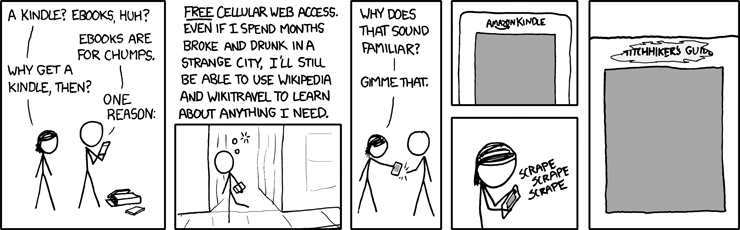
From xkcd

The web access is somewhat klunky although less so with the Kindle 2.  There are 3 modes: Basic, Advanced, and Advanced with javascript - and we can turn images off or on depending on how eager we are for data vs images.  The mobile versions of many websites make access quicker and with better formatting.

I use the 24/7 Net access when outside my home, often at stores where I can decide whether to buy something by Googling the product's model number and adding the word "review" -- this has saved me from some bad buys and also confirmed some possible buys would be good ones.

See my Tips for using the Kindle's web browser more effectively.

I was wishing, one day, that I could go check an internet machine somewhere to get information on something I wasn't sure about buying and suddenly remembered I had one in my purse :-)  At cafes, I often check something on the web.  Though I obviously love using the wireless, I am not out that often, so I don't think it's a super drain on Jeff.   (Click for a larger photo of my earlier Kindle, webbing at a cafe.)
  And here's a photo of my Kindle 2, posting to a forum and Googling a product at Target.

New Amazon fees affect some Kindlefeeder options below.
I also use kindlefeeder.com to get feeds onto to my Kindle each day (a manual click must be done now, for the free service (as automated daily sends will now cost $20/yr), and this includes up to a dozen feeds in your downloaded set (one file with table of contents for each periodical).  but good labor goes into this great service, so Daniel Choi posted that donations are welcome and his users have been responsive.  My subscription at kindlefeeder includes Engadget, Gizmodo, full-feed HuffingtonPost, NY Times Most Emailed, etc.   The set of several daily publications comes as one item each day, with a table of contents listing of and links to each downloaded periodical.  No need, in this case, to use the wireless when reading -- outside of the quick download of the daily set -- unless a feed is mainly summaries with links to the full article online.

But I also subscribe to Amazon's Kindle subscriptions that I find timely and well-written -- those include The New Yorker (w/the cartoons) at $3/mo and the NY Times Latest News, at $2/mo. -- this latter comes 2 or 3 times a day, anytime there's a big headline, which means a meaty story and there are usually about a dozen articles each download.
  While I can and did get The New Yorker feed for free, I prefer the special Amazon formatting for periodicals, allowing fast navigations to sections or to articles within sections and the usual Previous and Next article movement with the 5-way button.  I also love getting the cartoons with it.

MANUALS AND GUIDES FOR PRODUCTS BOUGHT:
I just about always lose my guides or manuals for various electronics and have now gone online to get the pdf versions, which I send to my Amazon Kindle address for auto-conversion and then they're auto-sent to my Kindle, where I can always find them (and am able to search for specific words).  This won't work well with PDFs that are primarily image-scans, as they'd load slowly and be too small for clarity and readability.  (Updated: There's a 15c charge on those conversions and deliveries direct to the Kindle for files up to 1 megabyte in size and 15c per megabyte after, rounded up -- but you can instead choose Amazon's free conversion and delivery to your regular email instead and and you can then transfer the file to the Kindle via the USB cable that comes with it.)

WEB INFO to your Kindle:
If interested in website info you've found, you can highlight the info, copy it the usual way (Windows: Ctrl-c or Mac: Cmd-c) and paste it into Winword or to a basic text file, then e-mail it to your Kindle, at which point it becomes a file of its own readable on your Kindle.  As mentioned in other entries, there are several ways to convert any web info into a PDF file as well, which then can be sent to your Kindle for Kindle-izing, but normally these should not be complex multi-columned pages although the Savory utility can work around that also.  More detailed info on the special image-type conversion here.

SEARCHING A BOOK OR ENTIRE LIBRARY on your Kindle:
The Kindle 2 now searches, as a default, only the book you happen to have open and you have the choice of it searching your entire Kindle library, which will then pretty quickly bring up all the books and periodicals with the word or phrase in question, showing summaries of each, and links to the appropriate pages.
  It also offers a search of google, if you prefer, or the Wikipedia, but you'll be asked to turn on your wireless in those cases.

  A SEARCH TIP from MobileRead forum's "Hemipod":
    "If you use the 5-way control to highlight a phrase, but don't finish the highlight, but instead press a key as if you were starting a search, the highlighted text is copied and pasted into the search box. Very, very easy way to search, say, wiki, for a phrase that's in your book."

INLINE DICTIONARY
Unlike the fatiguing and convoluted inline dictionary process for the Kindle 1, the Kindle 2 has direct cursor access to any word on a book or periodical's page, and if placed on a word, a 2-line definition of the word shows at the bottom of the screen (if the Oxford American dictionary includes the word).  If interested in the full dictionary definition plus pronunciation, you can press the Enter key on the keyboard to get that.  I used to guess the meaning of words via my understanding of the context, and it's been instructive for me :-) to actually use this feature at times.

HIGHLIGHTING, ANNOTATIONS KEPT WITH EACH BOOK (with Amazon library-backups for books bought from Amazon)
  You can easily highlight passages now, including highlighting that goes over several pages if wanted.  You can also make notes with the keyboard.  These are all searchable also, as described above for searching words or phrases.

  If the book was purchased from Amazon, then the store keeps a backed-up copy of your notes and highlighting of any book (kept in your library area at Amazon) so that if you delete the book either for space or to exclude it from your display of current titles on the Kindle, you can later re-download the book at no charge, and your highlighting and notes will be with the book. Your annotations are also kept, for viewing by book, on a password-protected private webpage when you have not disabled backup of annotations to the Amazon servers.  Here's a sample.

CLIPPINGS
The Kindle 2 now allows you to clip an entire article from a subscription newspaper or magazine with the press of a menu option.  These will go to your "My Clippings" file which is pure text.  As with any other e-reader, you can transfer the file to your computer via a USB cable and then edit it, since it collects all the clippings you've been making, which includes an extra copy of all highlighting you've done on various books so that you can use them in your text documents.  That way you can share with friends, if you have a computer, any information that's interested you enough to note it on your Kindle.  If you decide to delete the current "My Clippings" file from your Kindle the unit will create a new one for you the next time you highlight or make notes about something or when you request a clipping of an article you're reading in a periodical.  Otherwise, the Kindle just appends new notes to the file.

FONT SIZING AND LINE SPACING OPTIONS
I often find when reading normal books or magazines now that I almost instinctively start to make a movement to enlarge or decrease the font size or the spacing between lines. While almost any e-reader will give you a choice of font-sizes, the Kindle offers 6 font sizes and furthermore offers 9 settings for the amount of spacing between lines. Less spacing distance will get more lines to read on your screen while more distance may make a paragraph easier to read.  Key combo for line-spacing changes: press shift-alt together and then press a number between 1 and 9 to decrease or increase the line spacing from whatever your current choice is.  Default is '3' which is also the default for font size.

COST OF THE KINDLE PARTS
I've been amused by the reaction to recent articles about the cost of Kindle components, the general reaction equating the cost of components for the Kindle to the cost of building a Kindle and deciding that the amount over $185, from the [original] $360 price, makes it a 'cash cow' for Amazon.

 Those writers don't factor in what happens after the builders buy the components -- the manufacturing expense and the expertise to make the many features (beyond the usual e-book) work together well.  After selecting the components and readying the hardware and software conditions for the desired functions (involving a lot of paid people), then there's the mass assembling, transportation, warehousing, marketing, distribution, and management of inventory, plus (in Amazon's case) extensive customer support that's almost instantly reachable and normally more responsive than the usual (the one exception being Amazon's non-response about the lighter font issue of the Kindle 2 vs the Kindle 1).

Then there's the prepaid Sprint wireless, always 'On,' global net access which normally costs $30/mo. to have (minimum limited services) when added to basic cell phone service. That alone can cost $360, though I'm sure Amazon has a very good deal on it as long as we don't overdo the accessing (I might).  As pointed out in several entries here, netbooks given 24/7 cellular network wireless capabilities cost $60/mo. for the unlimited acccess.  Yes, it's faster access, with color, but it's aosl $720/year more on top of a netbook's unit cost

TEXT-TO-SPEECH FEATURE:
While newspapers have duly noted publisher reluctance to allow their books to be read "out loud" by the Kindle 2's automated mechanical-reader voice (they consider this as 'competition' for the professional actors reading novels with human inflections!), most publishers are allowing it. (Some Amazon users and disability rights proponents are boycotting Random House for their clueless policies against this feature)  And of course the feature can be used for reading aloud personal docs or periodicals you've downloaded if you're busy doing something else such as cooking or driving at the moment.   (I want to do a separate section on "Tom," the male voice for the Kindle because that's an intereting story.)  At any rate, this is not a feature most of us would use for any length of time!  But it's useful for the times you want to keep "reading" but must get on to other things for a bit.
  You can speed up or slow down the voice, and it turns pages for you :-).
  See a fun videoclip using the Kindle voice to read a part for a screenplay.

MP3's AND AUDIBLE BOOKS
There is a feature that allows you to play mp3s placed on your Kindle by you but they play only in the order in which they've been put on the reader.  The focus has not been on the Kindle being a music-playing machine.  This allows you to hear some of your favorite music while reading a Kindle book but it's a battery drainer. You can also put mp3s under the 'Audible' folder (since the Kindle plays Audible books also) and play those on demand but cannot read on the Kindle at the same time with this choice.  You can play mp3-audiobooks also.

NON-AMAZON BOOKS:
By the way, Kindle users are not tied to the Amazon store, although it now holds 7,400  20,000+ free books -- mainly public domain classics.  The few free books at Amazon that are not public domain ones (and usually available briefly) are found here.

  Tip:  Here's a long Amazon-forum discussion thread with tips on a million Kindle books (mostly free) for your Kindle from other sites.

OTHER UNUSUAL FORUM DISCUSSIONS
  Tip:  Amazon forum users talk about the unusually creative ways in which they use their Kindles.  Definitely an interesting read.

  Tip:  4/28/09 - Another interesting thread about how watching History Channel (or The Daily Show) and other tv shows about events have caused some to look up Kindle books on the subject that kindled interest :-)

  Tip:  4/20/09 - I was amazed at how many Huffington Post readers apparently have Kindles. In the thread for an article by Danielle Crittenden, some explain to her how much the Kindle can do despite a posting that deems the Kindle good only for reading books and not an Internet-aware device. Below are ways to Share this post if you'd like others to see it.
-- The Send to Kindle button works well only on Firefox currently.

Send to Kindle


(Older posts have older Kindle model info. For latest models, see CURRENT KINDLES page. )
If interested, you can also follow my add'l blog-related news at Facebook and Twitter
Questions & feedback are welcome in the Comment areas (tho' spam is deleted). Thanks!

Sunday, May 17, 2009

The value of 24/7 wireless, as shown by MiFi 2200

UPDATE - 5/17/09 is at the bottom of this article.
  Original posting: 5/12/2009 08:00:00 AM

The New York Times's David Pogue is excited by "Wi-Fi to Go, No Cafe Needed" though I have a memory of Pogue finding the Kindle 2 pricing unfathomably high (his editors had omitted the price), but that paragraph is gone and the price is there now.

That article explained the outstanding Kindle feature (wireless 24/7) and the cost of this normally.
'The big Kindle breakthrough was its wireless connection. Thanks to Sprint’s cellular Internet service, the Kindle is always online: indoors, outdoors, miles from the nearest Wi-Fi hot spot.

This sort of service costs $60 a month for laptops, but Amazon pays the Kindle’s wireless bill, in hopes that you’ll buy e-books spontaneously...

As a bonus, the Kindle includes a simple Web browser, great for quick wireless Wikipedia checks and blog reading.'
That $60/mo. x 12 = $720! Not much mystery in the pricing, on a unit with the expensive e-ink screen.

Pogue really knows the Kindle's features, unlike most columnists covering a wide range of gadgets.

With the article on Novatel's MiFi 2200 'Personal Hot Spot,' he sings a strong tenor on the amazing ability of this small gadget to provide cell phone style wireless wherever you are.
'But imagine if you could get online anywhere you liked — in a taxi, on the beach, in a hotel with disgustingly overpriced Wi-Fi —without messing around with cellular modems. What if you had a personal Wi-Fi bubble, a private hot spot, that followed you everywhere you go?'
Kindle users don't have to imagine that.  I use the Kindle to go online to read sites like Wired (with excellent photo reproduction) anywhere I happen to be.  But I've described that in previous posts.  Pogue continues:
Incredibly, there is such a thing.  It’s the Novatel MiFi 2200, available from Verizon starting in mid-May ($100 with two-year contract, after rebate). It’s a little wisp of a thing, like a triple-thick credit card... When you turn on your MiFi and wait 30 seconds, it provides a personal, portable, powerful, password-protected wireless hot spot.
The Mifi uses Verizon's 3G for its signal.  Pogue writes:
'If you just want to do e-mail and the Web, you pay $40 a month for the service (250 megabytes of data transfer, 10 cents a megabyte above that)... And if you don’t travel incessantly, the best deal may be the one-day pass: $15 for 24 hours, only when you need it.
  In that case, the MiFi itself costs $270 [rather than $100].
So that's another illustration of the often ignored value of the wireless feature of the Kindles.  There should be huge interest in the MiFi, because it also has a 30-foot range and up to 5 people can share this "Wi-Fi umbrella."

  The drawback of netbooks for me is the lack of wireless, but this will be a big help here, with the minimum $40/mo being more attractive than AT&T's program of wireless for netbooks, which starts at $50/mo. and is probably most useful at the $60/mo. level, and the Mifi unit can be used with any of your devices, including cellphones, the iPod touch, as well as the usual laptops.

  Be sure to read Pogue's full details and entertaining descriptions on this, and there's a video demo there.

Update - 5/17/09: The MiFi unit is being released Sunday.  Gizmodo wrote today that the $40/mo. wireless plan was "useless" and EVDOinfo writes, after their thorough review (including cons):
"...$40/mo plan that offers 250MB allowance, but only those who access the internet very infrequently should consider that option as 250MB is typically used up by most customers in less than a week of normal internet usage...
and JK On the Run's long review and replies to commenters says he already has the $60 Verizon plan.  Wireless and Mobile Reviews reviews the many reviews and it's a set of raves. Below are ways to Share this post if you'd like others to see it.
-- The Send to Kindle button works well only on Firefox currently.

Send to Kindle


(Older posts have older Kindle model info. For latest models, see CURRENT KINDLES page. )
If interested, you can also follow my add'l blog-related news at Facebook and Twitter
Questions & feedback are welcome in the Comment areas (tho' spam is deleted). Thanks!

Sunday, April 12, 2009

The Kindle and Sprint EV-DO's 24/7 wireless costs

There are no wireless costs at this point for the customer.  But there are for Amazon.  Information Week's Howard Anderson writes:
"On vacation, my wife was busy reading books on her new Kindle 2.0.  Do you know what they call Sherpas in the developed world? Husbands.  For years, I would go on vacation with a hernia-producing bag of reading material.  I was carrying atoms; now I carry electrons -- much lighter. The publishers make money because they don't have to buy paper and pay printers and the Postal Service.  Amazon makes money because it doesn't have to ship anything.  The consumer (me) gets books for $9.95.  The Kindle is as impressive as the iPhone, maybe more so.  How is this possible?  Because Sprint Nextel has excess capacity, which it sells to Amazon.  If you can't use your extra capacity to sell cellular service, then wholesale it to someone who can.

So Sprint Nextel is going to try to replicate what it's done with Amazon with any number of consumer electronics companies, such as Garmin, which offers a GPS device.  And since Sprint has excess capacity, it can assume that its costs are (almost) zero.  No billing expenses, no customer service.  That was what really cost money..."
It seems Sprint is looking to make similar deals with other companies, including Garmin.  Might that have an impact on wireless network speed?  There are times when I wonder if they intentionally throttle the download speeds for the Kindle access (unless we happen to be at the Amazon Kindle store).

Also, there are now many articles mentioning the enthusiastic use of the Kindle 2 by either the writer or the spouse.  I was surprised to see a somewhat over-the-top love letter to the Kindle by Slate.com's Jacob Weisberg, who is Slate Group's chairman and editor-in-chief and author of The Bush Tragedy.  A few of his remarks:
"I'm doing my best not to become a Kindle bore.  When I catch myself evangelizing to someone who couldn't care less about the marvels of the 2.0 version of Amazon's reading machine -- I can take a whole library on vacation!  Adjust the type size!  Peruse the morning paper without getting out of bed! -- I pause and remember my boyhood friend Scott H., who loved showing off the capabilities of his state of-the-art stereo but had only four records because he wasn't really that into music.

So apologies in advance if I'm irksomely enthusiastic about my cool new literature delivery system. Like the early PCs, the Kindle 2 is a primitive tool...But however the technology and marketplace evolve, Jeff Bezos has built a machine that marks a cultural revolution."
But then he goes too far, in surmising:
"The Kindle 2 signals that after a happy, 550-year union, reading and printing are getting separated.  It tells us that printed books, the most important artifacts of human civilization, are going to join newspapers and magazines on the road to obsolescence..."
WELL, I don't think so.  This is more like the idea that television would spell the death of movie theaters.  Most of us K-readers want both DTBs ("Dead Tree Books") AND K-books and periodicals (plus personal docs) on our Kindles.  I read far more than I did before but also find myself spending more time in Barnes & Noble enjoying hard-copy books of the type that cannot be shown successfully on a small e-ink unit.  However, in time, that will change too, I suppose.

 But a book or magazine with its own unique physical attributes and layout will always be an attraction, and a special treasure, although for actual ease of reading, it's hard to beat being able to change the font size and spacing between lines to suit our particular eyesight preferences and being able to carry around so much with you when out of the home.  Long waiting lines are no longer a problem for me.

If you click on the image that starts this entry, you'll be at a page that explains how wireless technology works, without hammering the reader with jargon. Below are ways to Share this post if you'd like others to see it.
-- The Send to Kindle button works well only on Firefox currently.

Send to Kindle


(Older posts have older Kindle model info. For latest models, see CURRENT KINDLES page. )
If interested, you can also follow my add'l blog-related news at Facebook and Twitter
Questions & feedback are welcome in the Comment areas (tho' spam is deleted). Thanks!

[Valid RSS]